











What Are AWS Cost Management Services?
AWS cost management services are tools and platforms to help organizations monitor, analyze, and control their spending on Amazon Web Services. These services provide insights into usage patterns, cost drivers, and potential areas for optimizing resource consumption. By using these offerings, organizations can align their cloud spending with budgets, predict future costs, and avoid unnecessary expenses.
The range of AWS cost management services includes both native, first-party AWS solutions and a diverse ecosystem of third-party tools. First-party tools integrate deeply with AWS infrastructure and offer features like budget alerts, granular usage breakdowns, and cost forecasting.
Third-party offerings often provide more analytics, integrations with other cloud providers, and additional automation capabilities. Together, these tools help organizations maintain cloud cost visibility while ensuring resources are allocated efficiently and responsibly.
Editor’s note: Article has been updated to cover recent market trends and current features and capabilities of AWS cost management services as of 2026.
Key Features of AWS Cost Management Services
AWS cost management services include several capabilities that help teams understand and control cloud spending. These features focus on visibility, forecasting, governance, and optimization. Together, they allow organizations to track where money is spent, detect unusual usage, and make informed decisions about resource allocation.
- Cost and usage visibility: Provides detailed views of how AWS resources are used and billed. Teams can break down spending by service, account, region, or time period to identify the main cost drivers.
- Budgeting and cost alerts: Allows organizations to set spending limits and receive alerts when usage approaches or exceeds defined thresholds. This helps teams react quickly and prevent unexpected charges.
- Cost allocation and tagging: Supports tagging resources with metadata such as project, team, or environment. These tags enable more accurate cost tracking and allow organizations to attribute spending to specific business units.
- Cost forecasting: Uses historical usage data to estimate future spending. Forecasting helps organizations plan budgets and anticipate how scaling workloads will affect costs.
- Anomaly detection: Monitors spending patterns and identifies unusual cost spikes. Automated alerts notify teams when spending deviates from expected behavior.
- Optimization recommendations: Analyzes resource usage and suggests ways to reduce costs, such as rightsizing instances, removing idle resources, or purchasing savings plans.
- Reporting and dashboards: Provides visual dashboards and downloadable reports that summarize cloud spending. These tools help stakeholders monitor financial performance and share insights across teams.
Cloud Cost Market Trends
To put AWS cost management in perspective, the global cloud cost management market is valued at USD 5.34 billion and is projected to reach USD 19.27 billion by 2033 according to recent market research, representing a compound annual growth rate (CAGR) of 17.6%. This growth reflects the rising importance of managing cloud spending as enterprises scale their cloud infrastructure. As more workloads move to cloud platforms, organizations need better tools to monitor usage, forecast costs, and prevent budget overruns.
A major driver of the cloud cost management market is the rapid adoption of multi-cloud and hybrid cloud environments. Many organizations now use multiple cloud providers to improve flexibility and resilience. However, this approach increases operational complexity and makes it harder to track and control spending. Cost management platforms address this challenge by providing centralized dashboards, real-time monitoring, and automated optimization tools.
The increasing use of AI, data analytics, and containerized workloads is also contributing to market expansion. These technologies often rely on dynamic scaling, which can lead to unpredictable cloud costs if not managed carefully.
Within the market, software solutions dominate, accounting for 68.4% of revenue in 2025. Organizations rely on software platforms for real-time cost visibility, usage analytics, automated optimization, budgeting, and financial reporting across cloud environments. However, services are expected to grow at the fastest rate.
Notable Third-Party AWS Cost Management Services
Third party cost management services provide advanced cost optimization features and the ability to manage costs across multiple clouds. Here are a few popular solutions.
1. Finout

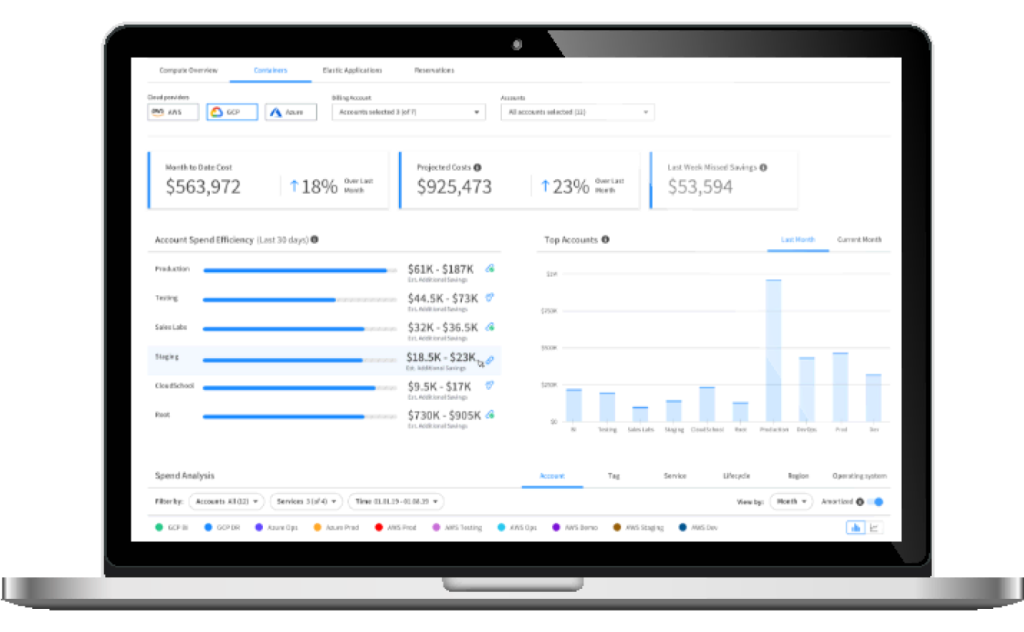
Finout offers a comprehensive suite of capabilities for AWS, designed to optimize and streamline cloud cost management.
Key features of Finout:
- Virtual Tagging: Allows for enhanced visibility and control over AWS resource allocation. This capability enables users to create and manage virtual tags without modifying existing infrastructure, ensuring a more flexible and precise cost allocation process.
- CostGuard: Enables waste detection across both AWS services and EKS (Elastic Kubernetes Service). Identifies unused or underutilized resources, providing actionable insights to reduce unnecessary expenses and optimize cloud usage.
2. CloudCheckr

CloudCheckr provides visibility and control over cloud spending across AWS and Azure environments. It enables organizations to analyze both current and historical usage data, helping teams understand which resources are driving costs and how they are being consumed. The platform also supports continuous optimization by identifying inefficiencies and recommending actions such as rightsizing or leveraging commitment-based discounts.
Key features of CloudCheckr:
- Cost visibility and analytics: Provides insights into cloud usage and spending across services, resources, and accounts
- Automated cost optimization: Identifies waste and recommends actions to improve efficiency and reduce spend
- Security and compliance checks: Includes built-in controls to ensure governance and regulatory alignment
- Custom reporting and billing: Supports tailored reports and accurate cost allocation across teams and customers
- FinOps collaboration tools: Enables teams to work together using shared data and insights
3. Amnic

Amnic is a cloud cost management platform that uses AI agents to automate financial operations and simplify cost analysis. It replaces fragmented dashboards with a unified system that provides real-time insights, automated reporting, and faster anomaly detection. The platform is designed to reduce manual effort and make cost data accessible across finance, engineering, and leadership teams.
Key features of Amnic:
- AI-driven insights: Generates actionable cost optimization insights using context-aware AI agents
- Automated reporting: Creates role-based reports automatically with minimal manual effort
- Anomaly detection and alerts: Identifies unusual spending patterns and notifies teams in real time
- Cost allocation and analysis: Breaks down costs across services, teams, and categories
- Forecasting and budgeting: Predicts future spend and tracks usage against defined budgets
4. Cloudability

Cloudability is a FinOps platform that helps organizations manage and optimize cloud spending across multi-cloud environments. It provides detailed analytics and reporting to improve cost transparency and enables teams to connect cloud usage with business outcomes. The platform supports continuous optimization by identifying inefficiencies and recommending cost-saving actions.
Key features of Cloudability:
- Multi-cloud cost visibility: Tracks and analyzes spending across cloud providers, applications, and containers
- Anomaly detection: Identifies unusual cost patterns and helps reduce waste
- Automated optimization: Applies performance-safe automation to improve efficiency and reduce costs
- Cost allocation and governance: Allocates costs across teams and ensures accountability through structured reporting
- Financial planning and forecasting: Supports budgeting, forecasting, and unit economics analysis
5. Kubex (formerly Densify)

Kubex is a resource optimization platform focused on Kubernetes environments, using AI and machine learning to automate infrastructure tuning. It continuously analyzes workload behavior and applies optimizations such as scaling, rightsizing, and workload placement. The platform emphasizes safe automation with policy controls to ensure changes are applied without disrupting production systems.
Key features of Kubex:
- Automated workload optimization: Continuously adjusts resource allocation based on real usage patterns
- Predictive scaling: Uses machine learning to forecast demand and scale resources proactively
- Node and cluster optimization: Recommends and applies optimal node configurations and scaling strategies
- Policy-driven automation: Ensures optimizations follow governance rules and approval workflows
- Kubernetes-wide visibility: Provides insights across clusters, nodes, and containers for better resource management
First-Party AWS Cost Management Services
In addition to third-party tools, AWS also offers its own cloud services, which are typically free but provide limited functionality.
6. AWS Cost Explorer
AWS Cost Explorer is a native analytics tool that helps users visualize and analyze AWS cost and usage data over time. It provides an interactive interface where teams can explore spending patterns, identify cost drivers, and detect anomalies. Users can create custom reports and forecasts, and analyze data at different levels of granularity, from high-level summaries to resource-level insights.
Key features of AWS Cost Explorer:
- Cost and usage visualization: Provides charts and tables to analyze spending trends over time
- Custom reporting: Allows users to create, save, and share reports tailored to specific needs
- Filtering and grouping: Enables analysis by service, account, region, or other dimensions
- Cost forecasting: Generates projections based on historical usage data
- Natural language analysis: Supports querying cost data using natural language for faster insights
7. AWS Billing Conductor
AWS Billing Conductor is a billing customization tool that helps organizations align cloud costs with internal financial models. It allows users to define custom pricing rules, allocate shared costs, and create billing groups that reflect business structures. This is particularly useful for implementing chargeback or showback models across teams or customers.
Key features of AWS Billing Conductor:
- Custom billing rules: Defines pricing logic and cost structures for different groups
- Billing group management: Organizes accounts into groups with tailored billing views
- Cost allocation and distribution: Distributes credits, fees, and shared costs across accounts
- Custom line items: Adds specific charges or adjustments to billing data
- Reporting integration: Generates cost and usage reports aligned with customized billing views
8. AWS Budgets
AWS Budgets enables organizations to set spending and usage limits and track performance against those thresholds. It supports different types of budgets, including cost, usage, and reservation coverage, allowing teams to monitor financial and operational metrics. Alerts can be configured for both actual and forecasted spending, helping teams take action before costs exceed limits.
Key features of AWS Budgets:
- Budget tracking: Monitors costs and usage against defined thresholds
- Alerts and notifications: Sends alerts when actual or forecasted spend exceeds limits
- Multiple budget types: Supports cost, usage, RI utilization, and Savings Plans tracking
- Automated actions: Triggers actions such as restricting resource provisioning when thresholds are exceeded
- Flexible time periods: Allows budgets to align with custom timeframes such as projects or fiscal periods
9. AWS Cost and Usage Report
AWS Cost and Usage Report (CUR) provides the most detailed view of AWS billing and usage data. It delivers granular line-item data for every resource and service, allowing organizations to perform in-depth analysis of their cloud costs. Reports are stored in Amazon S3 and can be integrated with analytics tools for further processing.
Key features of AWS Cost and Usage Report:
- Granular cost data: Includes detailed line items for each service, usage type, and operation
- Customizable reporting: Supports hourly, daily, or monthly aggregation levels
- S3 data delivery: Automatically delivers reports to an S3 bucket for storage and access
- Frequent updates: Updates reports at least daily with cumulative billing data
- Integration with analytics tools: Enables querying and analysis using tools like Amazon Athena or Redshift
10. AWS Cost Allocation Tags
AWS Cost Allocation Tags allow organizations to categorize and track cloud spending using metadata assigned to resources. Tags consist of key-value pairs that represent attributes such as project, team, or application. Once activated, these tags are included in cost reports, enabling detailed cost attribution and analysis.
Key features of AWS Cost Allocation Tags:
- Resource tagging: Assigns metadata to AWS resources for organization and tracking
- Cost attribution: Breaks down costs by tags such as cost center, application, or owner
- Support for multiple tag types: Includes both AWS-generated and user-defined tags
- Integration with reports: Displays tagged cost data in cost allocation reports and Cost Explorer
- Granular cost tracking: Enables detailed analysis of spending across business dimensions
Conclusion
Effective AWS cost management is essential for maintaining control over cloud spending and maximizing return on investment. By leveraging purpose-built cost management solutions, organizations gain the visibility and actionable insights needed to monitor usage, identify inefficiencies, and enforce financial governance.

.svg)