














Key Takeaways
- The definition: Inference cost is what you pay each time a trained model produces output, metered in tokens or in GPU (graphics processing unit) time.
- Why it matters: Inference cost recurs with every request and grows with adoption, yet it is only one slice of your total AI cost.
- The central principle: Unit prices can fall while your bill rises, because the number of tokens you buy tends to grow faster than prices drop.
- Where to start: Route, cache, trim, and cap your token use before you buy or rent more hardware.
- The outcome: With allocation in place, you can show finance a cost per feature and per customer that holds up to questions.
What Is Inference Cost?
Inference cost is what you pay to run a trained AI model each time it turns a request into an output. Model providers bill it per token, a small chunk of text that is often a word or part of one, while self-hosted models are billed as GPU time.
Inference cost is only part of AI cost, since orchestration (code that chains model calls), retrieval, evaluations, governance, and people sit outside the token line. The four layers of AI cost show where that other spend tends to hide.
Inference Cost vs. Training Cost
Training builds the model once, and inference runs it on every request. Training spend is lumpy and front-loaded, and it behaves like a capital investment.
Inference spend is continuous and usage-driven, and it behaves like an operating expense that grows with adoption. If you treat the two as one budget line, you hide what actually drives your inference cost.
The table compares training and inference by purpose, timing, main cost drivers, scaling pattern, and typical owner.
| Category | Training | Inference |
|---|---|---|
| Purpose | Teach a model from data | Use the model to answer requests |
| When you pay | In bursts, during training runs | Every time a request arrives |
| Main drivers | GPU hours, data size, number of runs | Tokens per request, request volume, model choice, utilization |
| How it scales | With model size and how often you retrain | With users, features, and agent steps |
| Who usually owns it | Research or ML platform teams | Product, platform, and FinOps teams together |
If you call a hosted model, you never pay for its training directly. Your model bill is all inference, plus everything you spend around it.
How Is Inference Cost Priced?
Most teams pay for inference in one of two ways: per token through an API, or per hour for GPUs they run themselves.
An API here means a hosted model your code calls over the internet. Either way, the rate card is only the starting point.
Input, Output, and Cached Tokens
Input tokens are everything you send: the system prompt (standing instructions), retrieved documents, conversation history, and the user's question. Output tokens are what the model writes back, and they usually cost more, as the GPT-6.1 Sol example below shows.
Cached input tokens are a repeated prompt prefix, meaning the identical opening part of a prompt that the provider has already processed. Providers that support caching bill those tokens at a lower rate, as the example below shows.
At OpenAI's GPT-6.1 Sol launch, the prices were "$2 per million input tokens, $0.10 per million cached input tokens, and $10 per million output tokens." That puts output at 5x the input price and cached input at 1/20 of standard input.
These are prices as announced in September 2026, and they change often. Other models and providers price differently.
Reasoning Tokens and Batch Tiers
Reasoning models think through a problem before they answer, and they bill for that thinking even though the user never sees it. Those hidden steps are called reasoning tokens, and a short answer can carry a long, billed trail of them.
Batch tiers push the price the other way. You send work that can wait, the provider processes it on a slower schedule, and you pay a lower rate.
Both change the effective price of a model, meaning what you actually pay per result once these factors count. Two teams on the same model can pay very different amounts per useful answer, depending on how much reasoning and batch work each one uses. The guide to how AI token pricing works covers reasoning, cached, and batch rates in more detail.
Self-Hosted Inference: Paying for GPU Hours
Self-hosting swaps a per-token meter for a per-hour meter. You rent or buy GPUs, and you pay for every hour they run, busy or idle.
That makes utilization, the share of GPU capacity doing real work, the number that sets your real cost per token. NVIDIA's GPU sizing guidance puts it plainly: "When capacity runs ahead of what a workload needs, utilization drops and cost per token rises."
Compare options on cost per token at your real traffic, not on GPU sticker price. An hourly rate tells you what you paid for hardware, while cost per token tells you what that hardware delivered.
Dedicated or provisioned capacity, where you reserve throughput in advance, makes sense only for steady, predictable traffic. The guide to dedicated vs. on-demand AI capacity walks through when that trade pays off.
What Drives Inference Cost Up?
Six things set most inference bills, and each one compounds the others. Agents, meaning AI systems that plan and act in several steps on their own, make several of them worse at once.
- Model choice: Large frontier models, the newest general-purpose models, cost more per token than small models, and you pay that gap on every call.
- Context length: System prompts, retrieved documents, and chat history get resent on every call, and you pay for all of it each time.
- Output and reasoning length: Long answers and long hidden reasoning trails both add billed tokens on the generation side of the meter.
- Calls per task: Gartner's inference cost forecast says agentic models "require between 5-30 times more tokens per task than a standard GenAI chatbot."
- Cache hit rate: This is the share of input served from cache, and a low rate means paying full price for the same prefix again.
- GPU utilization: On self-hosted models, idle GPU hours still bill, which pushes up the cost of every token you do serve.
One agent request can fan out into several model calls, and each call carries its own mix of billed tokens.
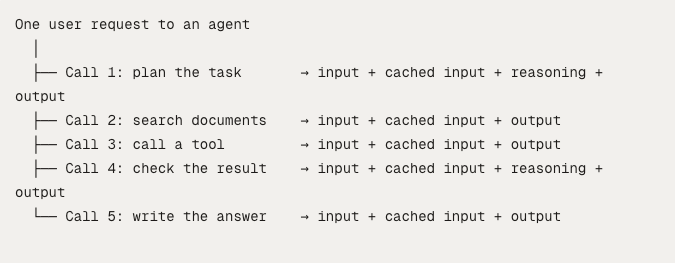
These drivers are linked. Routing to a cheaper model can break a warm cache, meaning one already holding your prompt prefix. Cutting reasoning can raise retries that cost more than you saved.
Why Does Your Inference Bill Rise When Token Prices Fall?
Your bill rises because you are buying far more tokens. A lower price per token cannot shrink the total when usage grows faster than the price drops.
Gartner forecasts that by 2030, inference on a 1-trillion-parameter large language model (LLM) will cost GenAI providers over 90% less than in 2025. Gartner still expects the total to climb: "As token consumption rises faster than token costs fall, overall inference costs are expected to increase."
Usage data shows how fast demand can move. In Alphabet's Q3 2026 remarks, Google reported that its first-party model APIs process nearly 32 billion tokens per minute. That is 40% more than the prior quarter and more than four times a year earlier, and it covers Google's own APIs only.
Cheap tokens change behavior. When each call feels cheap, it is easy to add a feature, lengthen the context, or give an agent a few more steps.
This is why simple forecasts miss. A base estimate of users times requests times tokens per request understates real demand, because it ignores hidden reasoning, agent loops, and cache hit rate.
How Do You Reduce Inference Cost?
Reduce the tokens each useful result needs and raise the share served from cache, before you change hardware. For code-level changes beyond these six levers, see these LLM token optimization tips.
The table compares six levers by what each one changes, the work it fits, and the downstream effect to watch for.
| Lever | What it changes | Good fit | Watch for |
|---|---|---|---|
| Model routing | Price per token | Classification, extraction, short summaries | Retries from a weaker model, or a reset cache |
| Prompt caching | Share of input billed at the cached rate | Long, stable system prompts and agent loops | Changing content near the top that breaks the prefix |
| Context trimming | Input tokens per call | Retrieval-heavy apps and long chats | Cutting facts the answer depends on |
| Output and reasoning caps | Output and reasoning tokens | Structured answers and simple tasks | Retries or wrong answers on hard tasks |
| Batch processing | Rate for work that can wait | Evaluations, backfills, nightly jobs | Slow turnaround for interactive agents |
| Self-hosting | Per-token meter becomes a per-hour meter | Steady, high-volume traffic | Idle GPUs raising cost per token |
1. Route Each Task to the Smallest Model That Meets the Quality Bar
Model choice sets the price of every token you buy. Send classification, extraction, and short summaries to small models, and keep large frontier models for hard reasoning.
Define the quality bar first, with a test set of real tasks and a pass rate you accept. Without it, you cannot tell a cheaper model from a worse one.
Then watch two side effects. A cheaper model that needs retries can cost more per useful answer, and a routing change can reset a warm cache.
2. Structure Prompts for Cache Hits
Prompt caching reuses work on the identical start of a prompt. Put static content first, such as instructions, tool definitions, and reference documents, and put anything that changes after it.
One change near the top of a prompt can break the match for everything after it. A timestamp or user name in the system prompt can quietly cost you the discount on every call.
ProjectDiscovery moved dynamic working memory out of its system prompt on one agentic workload, and its cache hit rate rose from 7% to 84%. Per ProjectDiscovery's prompt caching results, "caching saved 59% on LLM costs compared to what the same token volume would have cost at full input rates." These are self-reported numbers from one workload, measured against paying full input rates.
3. Trim Context Before It Reaches the Model
Every input token is billed on every call, including text the model ignores. Retrieval-augmented generation (RAG), where your app fetches documents and adds them to the prompt, is a common source of bloat.
Retrieve fewer, better chunks of text, and summarize old conversation turns instead of resending the full history. Drop tool definitions the task will not use.
Trimming pays twice in agent loops, because the same context is resent at every step. Just check that you keep the facts the answer depends on.
4. Cap Output and Reasoning Effort
Set output limits, ask for structured formats like JSON (a compact data format) or short lists, and choose reasoning effort per task. A label or a yes-or-no answer does not need a page of text or a long chain of thought.
The aim is more useful output per token, not fewer tokens at any cost. A token you never generate costs nothing. A reasoning step you cut from a task that needed it can cost more in retries than it saved.
5. Move Work That Can Wait to Batch
Evaluations (automated tests of model quality), backfills (reprocessing older data), nightly summaries, and bulk classification rarely need instant answers. Batch tiers lower the rate in exchange for slower turnaround.
Batch is a poor fit for interactive agents, where each step depends on the last one. If a user is waiting, keep the work on the standard tier.
6. Self-Host Only When You Can Keep GPUs Busy
Self-hosting pays off for steady, high-volume traffic that keeps your cluster busy. Before you migrate, benchmark cost per token at your real utilization, not at a vendor's peak throughput figure.
Spiky or experimental workloads usually fit managed APIs better, even at a premium. While a product is still finding its traffic pattern, paying per token keeps idle hardware off your bill.
How Do You Measure Inference Cost per Feature and Customer?
Attach business context to every model call, then allocate provider spend to the teams, features, and customers that caused it. Allocation means assigning each cost to the owner who created it.
Provider bills show totals by API key or project, not by feature. If three features share one key, the bill cannot tell you which one drove last month's increase.
Each call needs five fields before you can split the bill with confidence:
- Team: The group that owns the code making the call.
- Feature: The product capability the call supports, such as search or ticket triage.
- Customer or tenant: The account the request served, which makes cost per customer possible.
- Environment: Production, staging, or development, which keeps test traffic out of product costs.
- Model: The exact model and version, which lets you compare cost and quality across models.
If you want a step-by-step setup, here is how to track AI costs per customer by passing these fields through your code.
Unit economics means cost per unit of business activity, such as cost per request, per resolved support ticket, or per customer. Cost per token alone can mislead, because a pricier model that cuts follow-up questions can be cheaper per useful result.
The question that matters is what you pay for one useful result. Pair every cost metric with an outcome metric, such as resolution rate or task success.
The method is the same one teams already use for cloud spend. Bazaarvoice built client-level unit economics for its cloud spend with Finout, an enterprise-grade FinOps platform for cloud and AI spend, built for the agentic era.
Nicolas Guerra, Sr. Cloud FinOps Analyst at Bazaarvoice, put it this way: "Building client-level unit economics in a couple of days was unthinkable before Finout. Now it drives conversations about efficiency."
That result covers cloud unit economics rather than AI, but the same method applies to inference spend. You can read the full Bazaarvoice unit economics story for how the team set it up.
What Does This Mean in Practice?
The right first move depends on where your AI work sits today and which decision the numbers need to support.
If you are prototyping, estimate inference cost in ranges, because the move from proof of concept to production changes volume and behavior together. Real users bring longer chats, more retries, and traffic patterns your tests never saw.
If agents are in production, prioritize per-run cost ceilings and anomaly alerts, because a loop can multiply calls before anyone notices. Runaway inference, where an endpoint suddenly gets far more traffic than expected, often starts with a bug or a retry storm.
If you self-host, track utilization weekly, because idle capacity raises cost per token whether anyone is watching or not. When utilization stays low, consolidate models onto fewer GPUs or move the workload back to an API.
If finance asks what a feature costs, prioritize allocation before optimization, because you cannot defend savings on spend nobody owns. Start with the five fields above, then work back from the decision finance is trying to make.
Each role owns a different part of the answer. Engineering owns design choices like model, context, and caching, while FinOps makes the tradeoffs visible. Finance sets the budget envelope and the variance it can tolerate, which differs for an experiment and a mature product.
For forecasts, track blended cost per token, the average across all token types and models, alongside total token volume. The token economics guide shows how to model both together.
How Finout Helps You See and Control Inference Cost
Finout is an enterprise-grade FinOps platform for cloud and AI spend, built for the agentic era. Finout brings inference cost into the same allocation, planning, and governance workflow as the rest of your technology spend.
AI Cost Management ingests OpenAI, Anthropic, and Cursor costs next to your cloud spend, with cost per token by team and model. All of it lands in the MegaBill, Finout's unified view of AWS, Azure, GCP, OCI, Kubernetes, SaaS, and AI costs.
AI-Powered VTags propose explainable allocation rules from names, labels, accounts, and metadata, and your team approves them in bulk. Finout's predefined Virtual Tags normalize model brand, family, and billing channel across providers. They also deliver 100% cost allocation of token and inference spend to teams, features, and customers without code changes.
Billy answers plain-language questions such as "Which feature drove last week's OpenAI increase?" with chart-backed answers from your live data. Billy runs read-only, scoped to each user's permissions, and audit-logged.
FinOps Agents apply detection and investigation to inference spend under your own permissions and policies. Detection Agent scans cloud, Kubernetes, AI, and SaaS spend for waste and anomalies based on your definitions of waste. Investigation Agent traces each finding to its cause, owner, and blast radius (everything it affects) and Orchestration Agent turning an alert into an actionable case.
Anomaly Detection alerts you in Slack or email when spend spikes, such as runaway inference from a retry storm. Financial Plans set AI budgets and forecasts next to your cloud plans, with actuals synced against plan. The Unit Economics Widget tracks cost per unit, such as cost per customer or per request, on your dashboards.
If you want to see what each feature and customer costs you in inference, Book a demo.