
















What Is the Azure Pricing Calculator?
The Azure Pricing Calculator is a web-based tool provided by Microsoft that helps users estimate the costs of various Azure cloud services. Instead of relying on static price lists or manual calculations, users can tailor their estimates to specific use cases by configuring resources such as virtual machines, databases, storage, and networking components.
From a cloud FinOps perspective, this makes the calculator an important early-stage planning tool for aligning engineering decisions with financial expectations before resources are provisioned.
By allowing detailed customization, the calculator provides transparency around Azure's pricing models. It helps businesses understand how their particular resource requirements, deployment regions, and service tiers impact overall costs. The tool also breaks down pricing for each individual service, giving users insight into which elements contribute most to the final estimate and highlighting potential areas for optimization.
Common Use Cases for Azure Pricing Calculator
Estimating Cost for a New Cloud Project or Migration to Azure
Organizations planning a new project or migrating existing systems to Azure need a clear understanding of expected cloud costs before making architectural commitments. By inputting expected workloads, storage needs, and geographic regions into the Azure Pricing Calculator, businesses can see a detailed breakdown of what their chosen solution might cost each month or year. This upfront comparison is critical for determining if the move to Azure meets budget constraints or provides tangible cost savings over existing solutions.
Budgeting Monthly Cloud Spend for Existing Workloads
Once workloads have been deployed in Azure, ongoing cost control becomes an operational priority. The Azure Pricing Calculator allows teams to model ongoing service consumption as accurately as possible. By matching deployed resources and expected utilization to pricing calculator configurations, organizations can continuously monitor cloud costs and adjust as necessary, reducing risks of overruns or unexpected charges.
Forecasting Cost Growth Over Time
As project scopes evolve and business operations grow, cloud consumption typically increases, which can lead to unanticipated cost escalation. The Azure Pricing Calculator enables IT teams to model growth scenarios by projecting increased usage or scaling requirements within the tool. By simulating a range of future states—from minor increases in storage to massive scaling of compute clusters—stakeholders can predict how budget needs may evolve and plan appropriately.
Related content: Read our guide to cloud cost management
Key Considerations When Using the Azure Pricing Calculator
The Azure Pricing Calculator is designed for estimating costs based on known configurations, but it does not account for dynamic usage patterns or real-time consumption. It lacks integration with live telemetry data, which means estimates may diverge significantly from actual spend, especially in variable or unpredictable workloads. Additionally, pricing data updates may lag, leading to discrepancies between the calculator’s outputs and current billing rates.
Third-party cloud cost optimization tools go beyond static forecasting by analyzing actual usage patterns, offering real-time cost visibility, and identifying inefficiencies. Platforms like CloudHealth, Apptio Cloudability, and Finout provide detailed insights into spending trends, idle resources, and rightsizing opportunities that the Azure Pricing Calculator cannot detect.
These tools also support features such as anomaly detection, cost forecasting based on historical data, and integration with governance policies. This is especially critical for large organizations where multiple teams deploy resources independently. By using third-party tools alongside the Azure Pricing Calculator, businesses can bridge the gap between cost planning and cost control, ensuring budgets are grounded in real-world performance and usage.
Tutorial: Estimate Costs with the Azure Pricing Calculator
Follow these steps to create a cost estimate using the Azure Pricing Calculator:
1. Open the Azure Pricing Calculator
Visit the Azure Pricing Calculator at this address: https://azure.microsoft.com/en-us/pricing/calculator/
The calculator opens with a blank estimate.
2. Add Azure Services to Your Estimate
- Use the product picker at the top to search for a specific Azure service (e.g., virtual machines, storage, SQL database), or browse the catalog.
- Click the product tile to add it to your estimate. The product appears with a default configuration.
3. Configure Service Details
Let’s assume we have a web application that uses:
- Linux based VM
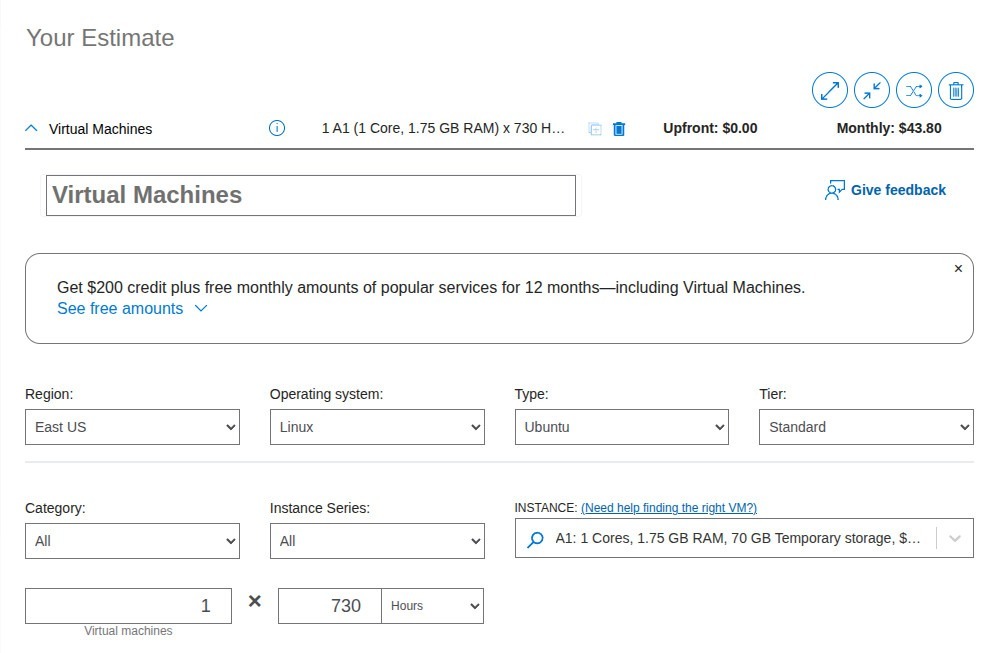
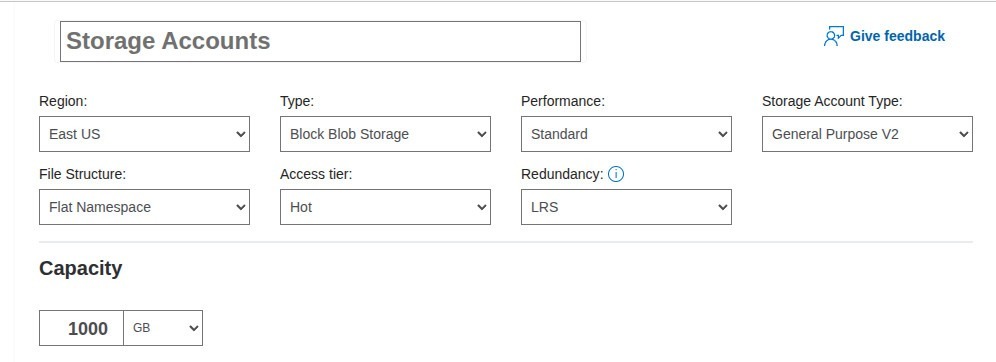
- Cloud storage for media, files, uploads
- Azure SQL Database
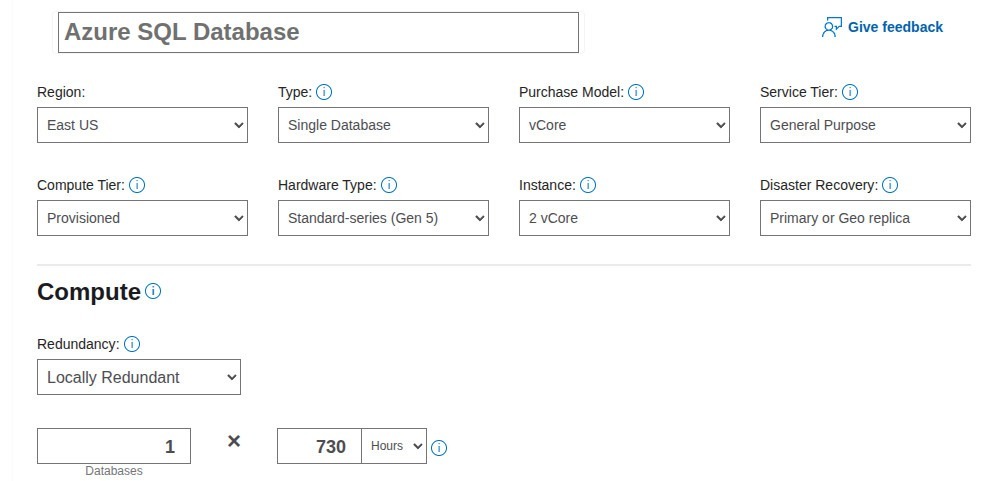
Each product you add will have a set of configuration options. These may include:
- Region: where the service will be deployed
- Tier or SKU: such as Basic, Standard, or Premium
- Instance size: for compute services like virtual machines
- Usage: such as hours per month or number of transactions
Adjust these settings based on your expected usage. The calculator automatically updates the pricing as you make changes.
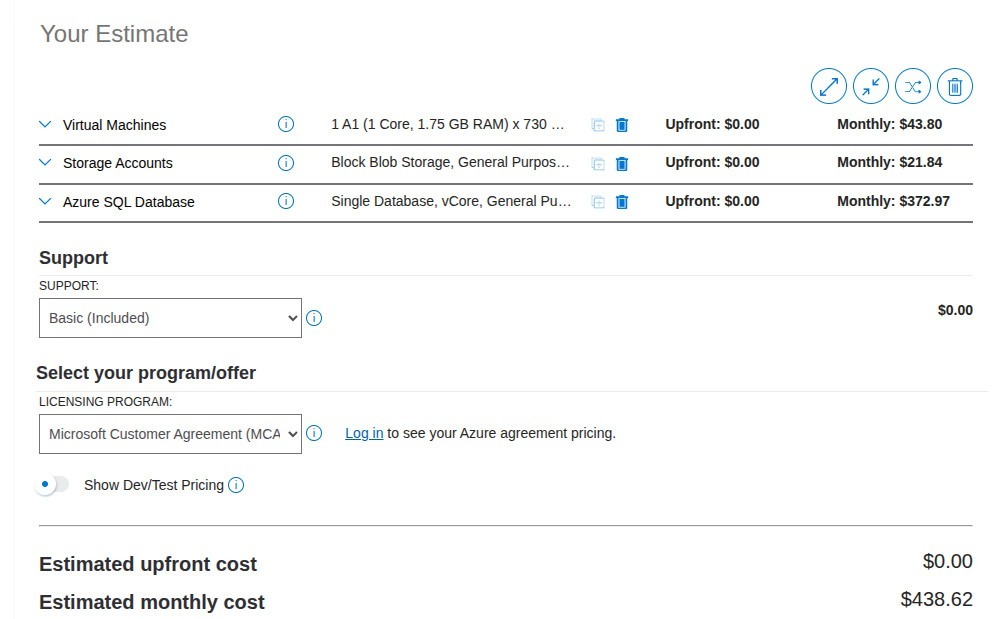
4. Apply Pricing Options
Some services allow you to select special pricing plans to reduce costs:
- Pay-as-you-go: no commitment
- Reserved instances: one- or three-year commitment for a discount
- Savings plans: flexible discounted pricing
Choose the pricing plan that matches your use case. The calculator will show upfront costs and monthly costs, depending on your selection.
E.g., for Azure SQL database, if you select a 1-year savings plan, your monthly cost will go down from $438.62 (for pay as go) to $295.23 (with no upfront).

At the bottom of the estimate, you can select a support plan. Options include:
- Basic (free)
- Developer
- Standard
- Professional Direct
5. Organize and Manage Your Estimate
Use the toolbar and estimate options to:
- Name each configuration for easier identification
- Group services by project or team
- Expand/Collapse configurations to see or hide details
- Clone configurations to duplicate a setup
- Delete individual services or clear the estimate entirely
6. Save, Share, or Export
Once your estimate is ready:
- Click Save to keep your progress
- Use Save As to rename an estimate
- Click Share to generate a link others can view (only you can edit)
- Click Export to download the estimate as an Excel file
Best Practices for Accurate Azure Cost Planning
1. Get Fresh Pricing Data
Azure prices can fluctuate due to market dynamics, currency changes, and periodic updates from Microsoft. To ensure accuracy, integrate automated pricing data refreshes via Azure’s published pricing APIs. This prevents decision-makers from relying on outdated numbers, especially when building estimates for long-term projects or complex, multi-service architectures.
For organizations managing large portfolios or using custom tooling, periodic data synchronizations should be incorporated into existing financial operations processes. By automating this refresh cycle, finance and cloud operations teams maintain continuous visibility into current price lists, minimizing the risk of budget overruns driven by stale assumptions.
2. Always Compare Pay-as-You-Go vs. Committed Spend
Pay-as-you-go is the default Azure consumption model, but significant savings may be achieved through reserved instances or savings plans for predictable workloads. Use the Azure Pricing Calculator's options to compare the costs of both models side-by-side. For workloads with stable, long-term demand, committed spend often reduces unit pricing significantly, optimizing budget efficiency.
Evaluate commitment scenarios as part of regular capacity planning, especially when scaling established environments or planning renewals. Even partial migration from on-demand to reserved resources can yield noticeable reductions in operating costs, making disciplined comparison a habit with tangible financial returns.
3. Incorporate FinOps Principles from Day One
FinOps emphasizes accountability, transparency, and optimization in cloud financial management. Embedding FinOps principles from the outset—such as cross-functional collaboration, continuous monitoring, and rapid adjustment of cloud resources—improves the accuracy of Azure cost planning. The calculator provides a shared view for technical and financial teams, supporting early dialogue and alignment.
By building FinOps feedback loops into routine operations, organizations spot inefficiencies and cost anomalies faster. Governance, chargeback, and tagging strategies, informed by calculator insights, help ensure spending aligns with business outcomes and that all stakeholders are incentivized to contribute to cost control efforts.
4. Simulate Demand Spikes and Scaling Events
Prediction is only as accurate as the assumptions behind it. Use the Azure Pricing Calculator to model not just steady-state consumption, but also demand spikes due to traffic surges, marketing campaigns, or seasonal patterns. Adjust variables such as compute instance counts, network throughput, and storage usage to simulate potential scaling events and their budget impacts.
Frequent scenario analysis uncovers areas that are most vulnerable to cost spikes and highlights opportunities for optimization, such as using autoscaling, queuing, or hybrid solutions. This proactive modeling ensures that resource planning reflects real-world behavior, reducing the likelihood of cost surprises when unexpected demand materializes.
5. Use Specialized Cloud Cost Optimization Tools
While the Azure Pricing Calculator provides valuable estimates, it doesn’t offer advanced analytics or real-time insights into actual usage. Tools like Azure Cost Management and third-party platforms like Finout provide deeper cost visibility. These tools offer granular reporting, anomaly detection, forecasting, and budget enforcement, which are essential for organizations with large or complex cloud environments.
These platforms also help correlate costs with business units, projects, or departments through automated tagging and cost allocation rules. By integrating these tools during planning, teams can validate their estimates against live consumption data, refine assumptions, and implement automated policies for budget control and resource efficiency.
Conclusion
The Azure Pricing Calculator is a critical tool for anyone planning, deploying, or managing services on Azure. While it doesn't replace live cost monitoring tools, it provides a solid foundation for understanding potential costs, comparing pricing models, and preparing budgets. When used alongside real-time optimization platforms and FinOps practices, it becomes part of a comprehensive strategy for controlling cloud spend and making informed infrastructure decisions.

.svg)




