













 Written By
Asaf Liveanu

Finding savings is solved. Acting is still manual.
Every FinOps leader I talk to wants the same thing: to 10x the practice. Ten times the savings acted on, ten times the coverage, with the same team. Headcount will not get you there. The cloud grows faster than any team can hire. The only way to 10x a FinOps practice is to take the manual work out of it.
Ask any FinOps team where the savings are and they will show you a list. Idle databases. Oversized volumes. Instances that peak at 3% CPU. Finding the waste is no longer the hard part.
That is the job Finout Agents took over when we released them in October.
- Detectors find the waste. They run across your cloud on a schedule, using your thresholds instead of a static rule.
- The Investigator proves it. Each result is checked against real usage, and the saving is priced at what you actually pay, discounts included.
- Findings hold the result. One place with the proof, the saving and the owner.
The list now builds itself, and every item on it comes with evidence.
So finding is solved. The hard part is everything that comes after. Someone has to find the owner, open the ticket, chase for an answer, make the change, and check that the saving landed. For every item on the list, by hand.
Today we are introducing Finout Workflows, and with it the Orchestrator: the agent that gets every Finding to its owner and follows it to done.
The work nobody budgeted for
Take one Finding. An idle RDS instance in staging, 2.9% peak CPU over 30 days, $576 a month, owned by the data team. It is clear, it is proven, and it is worth nothing yet. To turn it into a saving, someone has to:
- 1. Find the owner
- 2. Open the ticket
- 3. Chase for an answer
- 4. Make the change
- 5. Check the saving landed
Now multiply that by every Finding, every week.
And the list keeps getting harder to manage. Findings now come from AWS, GCP and Azure, and from more than one source: Finout's Detectors, the cloud providers' own recommendations, anomalies, untagged spend. Every cloud has its own services, and every service has its own kind of waste: compute, storage, databases, Kubernetes, commitments, and now AI. Each type has a different owner, a different fix and a different risk. No one person can hold all of that in their head, and no spreadsheet keeps up with it.
We see this in how our own customers work. Teams still investigate anomalies by hand, review Findings one at a time, and build reports from scratch.
We hear it in every conversation too. One FinOps lead investigates every saving alone, then chases engineering in Jira. Another team scrapes Grafana with scripts, reconciles in Excel at month end, and walks the list in team meetings. A third opens fifty tickets where one per team would do.
The FinOps team is small, often one person. The engineers who own the resources have a roadmap of their own. So the list grows, and the savings stay on the list.
A saving is only real once someone acts on it. That is the gap we are closing.
Meet the Orchestrator
Detectors find the waste. The Investigator proves it. Until now, the next move was yours.
The Orchestrator takes that move. Finout already holds what it needs to act: your bill at the rates you actually pay, the usage behind every resource, the owner from your Virtual Tags, and the Investigator's proof on each Finding. The Orchestrator turns that context into work that gets done.
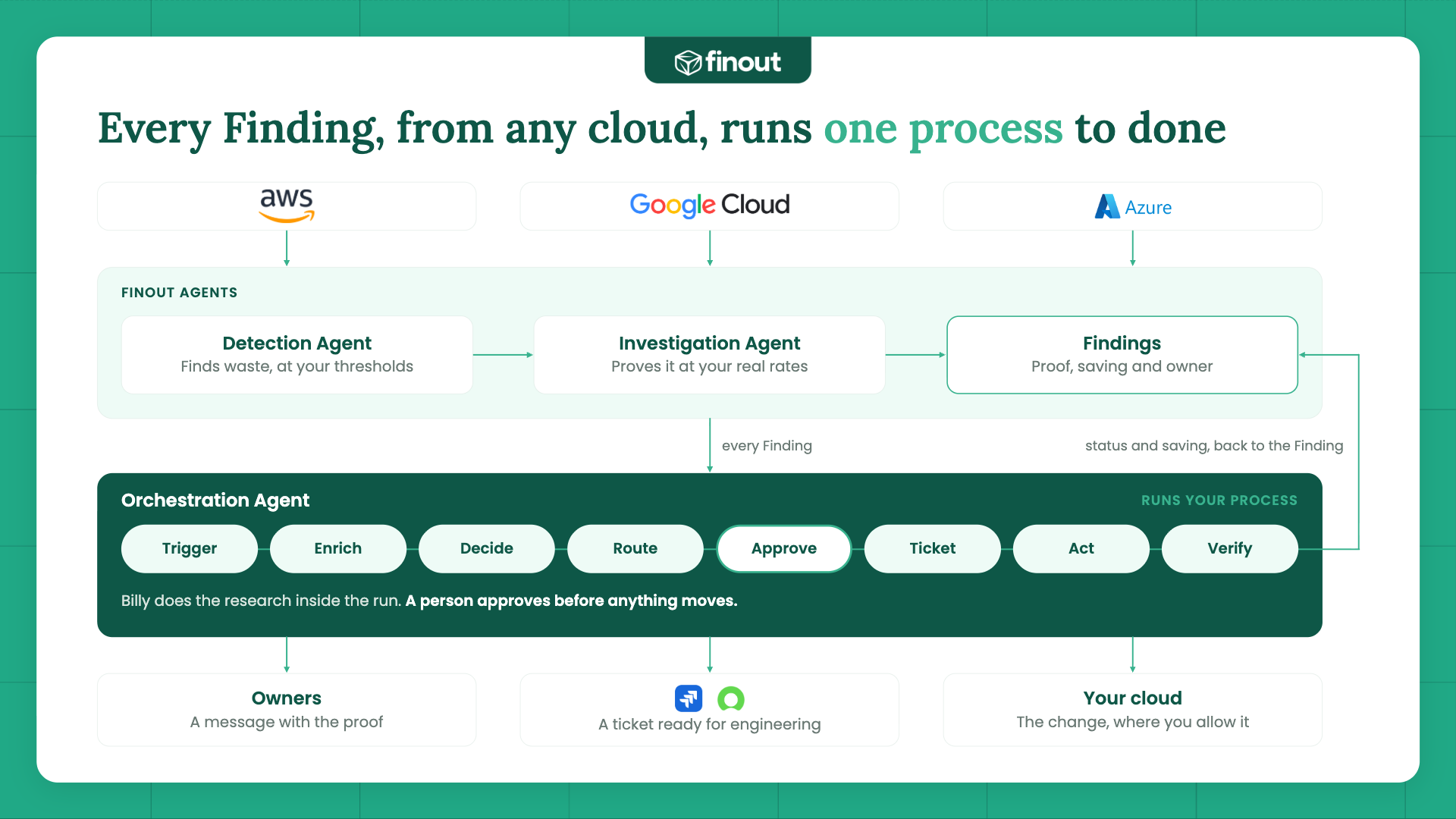
The Orchestrator is the agent that moves the Finding. It runs your process, the same steps your team does by hand today. Here is one run, for an oversized EBS volume:
- Trigger. A Detector opens a new Finding. That starts the workflow.
- Enrich. The Investigator's proof travels with it. An Ask Billy step adds the answers the owner will ask for next.
- Decide. Conditions send each Finding down the right path: by saving, by environment, by team.
- Route. The owner gets a message with the proof and the saving. No spreadsheet, no guessing.
- Approve. The Orchestrator asks a person for a yes before the work moves on. Nothing reaches engineering without it.
- Ticket. An Ask Billy step prepares the ticket for R&D: it does the research an engineer would start with and writes it up. The ticket opens in Jira or ServiceNow, already assigned.
- Track. The ticket and its status show on the Finding, so the savings backlog stays honest.
- Act. Where you allow it, the Orchestrator makes the change itself, or raises it as a change to your infrastructure code.
- Verify. Finout checks that the saving landed, and closes the Finding.
What the Orchestrator brings
- Your process, as a workflow. Build a workflow from scratch, step by step, or start from a ready-made one and edit it to fit. A Finding in production does not have to travel the same path as one in staging.
- One process for every cloud and every source. A Finding is a Finding, whether it comes from AWS, GCP or Azure, from a Detector or from the cloud provider's own recommendations. The Orchestrator handles them all the same way, so you manage one process and stop managing one per cloud.
- Judgment at every branch. Condition steps decide what happens next, by the size of the saving, the environment, the team or the type of resource. A small saving gets a message. A large one gets an approval and a ticket.
- Billy inside the run. An Ask Billy step puts Finout's AI assistant to work in the middle of the workflow. Billy answers the questions an engineer asks first: what this resource is, what it costs, how it has been used, and what changes if it is resized. The answers go into the ticket, so R&D starts with the research already done.
- A person in the loop. An approval step holds the run until someone says yes. You decide who approves, and where in the flow the question is asked.
- Tickets where engineering already works. The Orchestrator opens the ticket in Jira or ServiceNow, filled in and assigned. Nobody copies numbers out of a dashboard.
- A backlog that stays true. Ticket status syncs back to the Finding. You see what is open, what is in progress and what is done, without asking anyone.
- Action, when you allow it. The Orchestrator can resize, stop or clean up the resource itself, or open the change against your infrastructure code for the owner to merge. Only inside the limits you set.
- Proof the saving landed. After the change, Finout checks the bill. A Finding closes when the money stops being spent, and stays open when it does not.
The result is a FinOps team that spends its time on decisions. The follow-up runs on its own.
How much of this the Orchestrator does on its own is your call.
You choose how far it goes
Letting an agent act on your cloud is a trust decision. Customers told us that plainly, so Workflows starts where trust starts: read-only. The Orchestrator tells the owner, asks for a yes, opens the ticket and tracks it. Your people make the change.
From there, each workflow goes as far as you allow:
- Tell the owner. A ticket with the proof, tracked until it is done.
- Ask me first. The owner approves in the flow, then the work moves on.
- Fix it, or we will. The owner gets notice and time to object.
- Fix it for me. Non-production changes happen automatically. Production waits for a yes.
Each step up comes with its guardrails: approval gates, scope by Virtual Tags, non-production only, lead time before acting, and a cap on resources touched.
Agents and Findings stay with Admins until you grant them in a role.
Where this goes: all FinOps work, as workflows
Savings are where we start, because that is where the manual work is most visible. They are not where we stop. Our direction is simple: everything becomes a Finding, and every Finding can run a workflow.
- More ways to start. A schedule, such as a weekly savings review per team. An anomaly, the moment it is found.
- Automatic tagging. Untagged spend found, the owner resolved, the tag written.
- Anomaly root cause. Every anomaly investigated, explained, and sent straight to its owner.
- FinOps for AI. One person's AI spend jumps far above their own normal. The Investigator adds the cause: which tool, which model, since when. The team lead decides what changes.
You will not need to learn a new tool to build these. Billy already drafts a Detector from one sentence. You know the problem, and Billy turns it into an agent.
The goal is 10x the FinOps work, with the manual work taken out. Your team keeps the judgment: what matters, who owns it, how far automation goes. The chasing goes to the Orchestrator.
How to start
Starting takes three steps:
- 1. Turn on Findings. The agents are live today. Let them run on your accounts.
- 2. Watch what you still do by hand. After each Finding, who did you chase, and what did you open?
- 3. That is your first workflow. We build it with you.
Talk to your Finout team to see the Orchestrator run on your own Findings.