













Key Takeaways
- The direct answer: Replace one flat cap with layered attribution, team budgets, soft thresholds, limit responses, targeted hard limits, and monthly outcome reviews.
- Why flat caps fall short: In Finout's view, a flat cap limits volume instead of waste, and heavy AI users are often the most productive.
- The central principle: Decide what happens when a budget runs out before you decide how big the budget should be.
- Where to start: Give every AI dollar an owner across cloud AI services, direct provider contracts, AI developer tools, and AI-priced SaaS.
- What you get: AI spend that finance can predict and that grows in step with the value your teams deliver.
How Do You Control AI Spend Without Capping Teams?
You control AI spend without capping teams by giving every dollar an owner, budgeting where the risk sits, and warning early with soft thresholds. When a budget runs out, you route or approve the work instead of blocking it. Hard limits go on agents and experiments, and spend gets judged by cost per successful outcome.
A spending cap is a hard dollar ceiling that stops usage when it's reached. A budget is a planned amount with a defined response attached. A cap answers "how much" and never answers "what happens next."
The business question underneath is whether you can keep scaling AI without surprises, and whether that AI is paying off. Answering it means treating AI cost as total spend, because tokens are only the part you can easily meter.
Why Flat AI Spending Caps Backfire
Caps are the reflex for good reasons. They're simple, predictable, and easy to explain to finance.
In Finout's view, a monthly cap ranks people by volume and trims from the top, and volume isn't the same thing as waste. The heaviest user may have rebuilt a whole workflow around agents, which is exactly the behavior you were hoping to buy.
A shared team pool fails in a different way. When one workload eats the allowance, everyone else hits the wall too, and a budget event becomes an outage. A cap set in one tool's console never sees spend in other tools.
In the FinOps Foundation AI budget roundtable, one practitioner described "tiering token allocations by demonstrated productivity rather than issuing a flat per-seat limit." That's a budget that rewards output instead of punishing usage.
Finout's case for guardrails instead of blockers is that governance that blocks experimentation gets routed around. Block the approved tool and the work can move to personal AI accounts nobody sees. The Harmonic Security personal AI accounts research, a security vendor's 2026 study, found "64.5% of activity on personal accounts is business use, not personal."
What Actually Drives the AI Bill
Tokens are the most visible part of AI cost, not the whole of it. A token is a small chunk of text a model reads or writes. Providers bill input tokens (what you send) and output tokens (what comes back) separately.
A flat cap sees none of these drivers directly:
- Reasoning tokens: Reasoning models think before the visible answer. The Google Cloud thinking documentation says, "You are billed for tokens generated during the thinking process."
- Agent loops: One agentic prompt can become many model calls, and each call can carry the accumulated context again, billed as input.
- Cache hit rate: Per the AWS Bedrock prompt caching guide, "Prompt caching stores a snapshot of partially processed input so that subsequent requests with the same prefix skip redundant computation." A low hit rate means more input gets reprocessed.
- Model choice: A premium model on a routine task costs more per result without making the result any better.
- Work outside the token line: Orchestration, retrieval, evaluations, governance, and the people running it all never show up as tokens.
It helps to see these as a chain. Production is what it costs to make a token, consumption is how efficiently you use it, and value is what it returned. A flat cap acts on exactly one link: consumption volume.
Routing, caching, and loop limits act on efficiency, and outcome metrics act on value. Fix a broken cache and cost per request drops, which lowers cost per outcome and widens the margin on any feature built on it. These LLM token optimization tips cut wasted tokens without cutting usage.
The AI Spend Control Stack at a Glance
The table compares six controls by what each one stops, what happens when it triggers, and who owns it.
| Control | What it stops | What happens when it triggers | Who owns it |
|---|---|---|---|
| Attribution | Spend with no owner | Unowned spend lands in a review queue | FinOps |
| Team and purpose budgets | One team's usage blowing up the forecast | Variance shows against plan | Finance sets the envelope; the team lead owns the line |
| Soft thresholds and anomaly alerts | Overruns nobody notices until the invoice | The owner gets an alert and work continues | Budget owner |
| Limit responses (fallback, queue, approval) | Budget events turning into outages | Work reroutes, waits, or goes to an approver | Engineering, with the budget owner |
| Hard limits (agents, experiments) | Runaway loops and open-ended tests | Execution stops or pauses | Engineering and the agent's owner |
| Outcome review | Spend that grows without returning value | Budget moves toward better cost per outcome | Finance, engineering, and FinOps together |
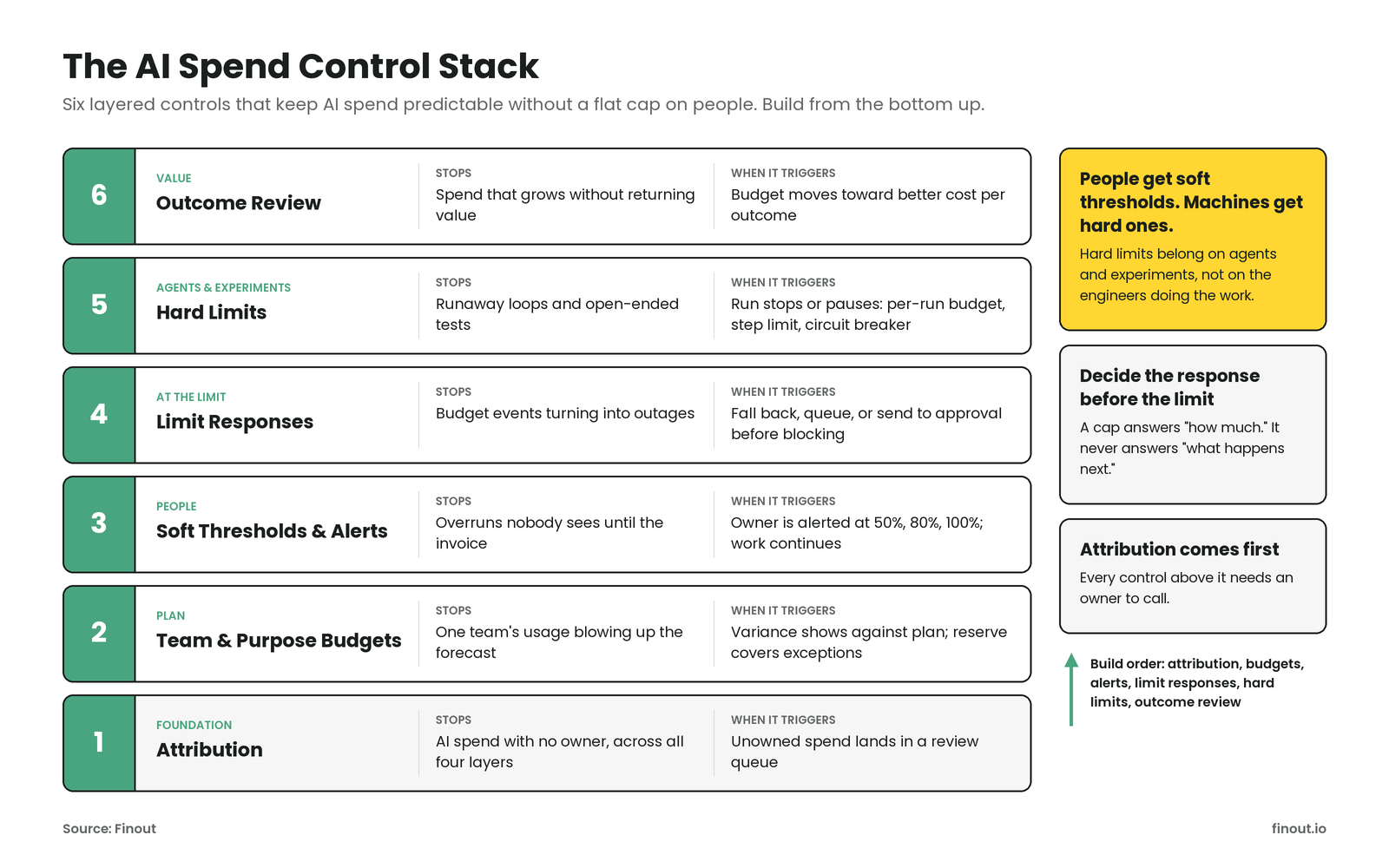
Attribution sits at the bottom because every other control needs an owner to call. Starting with the hard cap and adding the rest later is backwards.
How to Roll Out AI Spend Controls Without Slowing Teams
It's common to set the limit before you can see what it will hit. In this sequence, limits come fifth, after inventory, attribution, budgets, and alerts.
Step 1: Inventory AI Spend Across All Four Layers
AI spend lives in four places at once. Finout's framework for finding it orders the layers by how visible they usually are:
- Cloud AI services: Amazon Bedrock and Google Vertex AI costs, billed inside your infrastructure bill and usually visible.
- Direct provider contracts: Anthropic and OpenAI API spend, billed outside the cloud bill entirely and often poorly tracked.
- Token-based developer tools: Cursor, GitHub Copilot, and Claude Code costs, adding up across seats and projects in a common blind spot.
- AI-driven SaaS pricing: SaaS tools moving off seat pricing toward usage that scales with AI consumption, another common blind spot.
The layers are concurrent, not stages of maturity, and most organizations have spend in all four right now. A limit set in one console never sees the other three.
Layers 3 and 4 are where you'll find spend nobody was tracking. AI coding tool spend can swing sharply between developers, and these Claude Code spike patterns show how subagent fan-out and resent context move one person's bill. On each line, separate seat fees from usage charges, and name one owner per contract.
Step 2: Attribute Every Dollar to an Owner
Attribution starts with identity. Give each application and environment its own API key or workspace, and give agents service accounts instead of personal keys.
Then add request metadata: team, feature, environment, and customer where it applies. Map those fields to the cost centers and product lines finance already reports on. That mapping powers showback, which reports each team's AI cost back to the team that created it.
Avoid splitting AI cost by headcount, because usage varies widely by role. As Finout's guide to per-developer AI cost attribution explains, developers consume agent capacity at materially different rates. An even split hides both the heavy users worth funding and the waste worth fixing.
Shared costs need a rule too. The AI gateway, vector database, and evaluation pipelines serve many teams, and they need an agreed split before anyone sees a chargeback. Without attribution, any budget is a number with no one to call.
Step 3: Set Budgets at the Level That Owns the Risk
Budget by purpose, not just by team. Finout recommends three tiers, because experiment, production, and exception spend carry different risks:
- Experimentation budget: Bounded, time-boxed, and hard-capped, because an experiment that runs forever is a production workload nobody approved.
- Production budget: Tied to a forecast and to the outcomes the workload delivers, with soft thresholds instead of hard stops.
- Held-back reserve: Money set aside for high-value exceptions, released by approval instead of by lifting a cap.
The tiers are Finout's interpretation. The FinOps Framework Budgeting capability says organizations need "a shorter budgeting cycle, with more flexibility built in through holdbacks and out of cycle adjustments." The Framework names AI among the fast-moving categories that call for this.
Keep the tiers few. Every budget line is something someone has to maintain.
Finance and engineering split the work. The same FinOps Foundation roundtable write-up says "Finance sets the envelope and the tolerance," and engineering turns that into enforceable controls. It also warns that "a budget without a quota is a number, not a control."
Structure budgets as a hierarchy: org envelope, then team, then user or project, then agent. Per-user sub-limits stop one workload from draining a shared pool. You can tier those sub-limits by role or by demonstrated output.
Here's an illustrative example with round numbers, not a benchmark:
- Team allocation: A 40-person product engineering team gets $40,000 a month for AI tools and APIs.
- Default model: Routine work runs on a standard model by default, with no per-request approval.
- Premium allowance: Each engineer gets $300 a month for premium models, totaling $12,000, with higher tiers for proven heavy users.
- Reserve: The team holds back $5,000, or 12.5%, for approved exceptions. The other $23,000 covers standard-model usage and shared costs.
Step 4: Warn Early With Soft Thresholds and Anomaly Alerts
A soft cap is a threshold that notifies and escalates while work continues. A hard cap stops work when it's reached. For people, start with soft caps.
Use a threshold ladder, such as alerts at 50%, 80%, and 100% of budget. Route each alert to the budget owner who can act, not a shared inbox nobody reads.
Pair thresholds with anomaly detection, which flags spend that breaks from its normal pattern. A fixed threshold misses a spike that starts mid-month, because the monthly total can still look fine on day 12.
Watch before you enforce. Cloudflare's spend limits launch post says to "start with a high limit in monitoring mode to understand your current usage patterns before you start enforcing."
Finout customer DFDS uses budget alerts for cost governance. In the DFDS budget alert setup, DFDS sets budgets for specific services, and developers get an automated alert if spending exceeds the budgeted amount.
That setup paid off when one team's AWS dashboard refreshed six times a minute and cost $1,000 per day. Before Finout, it could have taken DFDS a week or more to notice. With Finout, DFDS noticed immediately.
Step 5: Decide What Happens When a Budget Runs Out
A cap needs a failure policy, and you should write it before the cap goes live. At the limit, you have four options: fall back to a cheaper model, queue work that can wait, require approval, or block.
A fallback model is a cheaper, pre-approved model that takes over when the primary model's budget is spent. The fallback has to be able to do the job. A cheaper model that fails the task and retries three times can cost more than the premium model it replaced.
At Run maturity, the FinOps Framework expects spend near a budget line to trigger "a defined response, such as an alert, approval gate, or throttle." Throttling slows work down, while a fallback reroutes it.
In Cloudflare AI Gateway spend limits, once the primary budget is exceeded, "AI Gateway automatically routes requests to the fallback model instead of blocking them." That's one vendor's feature, labeled beta in Cloudflare's docs, and blocking stays the default until you configure a fallback route. Cloudflare also calls enforcement eventually consistent, meaning a burst of requests can briefly exceed the limit.
The table compares five common limit situations by the response that fits and why it fits.
| Situation | Recommended response | Why |
|---|---|---|
| Routine task, premium budget spent | Fall back to the standard model | The cheaper model handles routine work at a lower cost |
| Complex task, capable fallback exists | Fall back and monitor quality | Retries can quietly erase the savings |
| High-value task, no capable fallback | Send to approval | A named owner decides whether the result is worth the spend |
| Work that can wait | Queue until the budget window resets | Nothing is lost by running it next cycle |
| Policy-restricted request or runaway loop | Block | Stopping is the only safe response |
Every response routes back to the owner you named in Step 2. An approval gate with no approver is just a block with extra steps.
Step 6: Put Hard Limits Where They Belong: Agents and Experiments
Hard limits aren't the enemy. They're misplaced when they sit on people, and they fit well on autonomous workloads that can spend faster than anyone can watch.
Agents need four controls:
- Per-run budget: A dollar ceiling for one agent run, meaning the full sequence of steps the agent takes to finish one task.
- Step or call limit: A maximum number of steps or model calls per run, which stops loops that never converge.
- Timeout: A maximum run time, after which the agent stops and reports what it finished.
- Circuit breaker: An automatic pause that trips when spend moves sharply away from the agent's normal baseline.
Give every agent an owner and a cost center when it's registered, the same way you'd assign a service. Experiments get time-boxed hard caps that expire when the experiment ends.
The rule of thumb: people get soft thresholds, machines get hard ones. Finout's guide to agentic AI cost governance covers per-request, per-session, and per-day agent limits in more detail.
Step 7: Review Spend Against Outcomes Every Month
Cost per successful outcome is the total AI cost of a workflow, including retries and rework, divided by the results someone accepted. Accepted results might be merged pull requests, resolved support tickets, or summaries a reviewer signed off on.
This is the number to bring to engineering leaders, because it measures what the spend delivered instead of what it bought. Hold a monthly review with finance, engineering, and each budget owner.
Cover four things in that review: spend against budget, the cost-per-outcome trend, limits lifted "just this month," and unused seats. Move budget toward teams whose cost per outcome is falling. Ask harder questions where it's rising.
A model swap or a cache fix lowers cost per outcome, and that moves the margin of every product that ships the AI feature. If you price AI features on consumption, cost per outcome also sets how much room your price has. For finance, that's the link between AI spend and the business model, covered further in measuring the ROI of AI.
How to Tell the Controls Are Working
Controls are working when spend is predictable and people rarely hit a wall. The table compares six signals by what each one measures and what a bad reading tells you.
| Signal | What it measures | What a bad reading means |
|---|---|---|
| Allocation coverage | Share of AI spend with a named owner | Budgets and alerts are missing part of the bill |
| Budget variance by team | Actual spend against plan, per team | Forecast inputs or thresholds need adjusting |
| Cost per successful outcome | AI cost divided by accepted results | Spend is growing faster than delivered work |
| Fallback and approval rates | How often limits reroute or escalate work | Budgets are sized too tight, or the default model is wrong |
| Block rate on legitimate requests | How often people get stopped mid-task | Hard limits are sitting on people instead of agents |
| Anomaly time-to-detect | Time from spike start to owner alert | Alerts are going to the wrong place, or thresholds are too coarse |
For people, the block rate should trend toward zero. If it doesn't, you've rebuilt the flat cap under a different name.
Common Mistakes When Controlling AI Spend
Most of these mistakes share a root cause: the limit arrived before the visibility.
- One shared team pool: One heavy workload drains everyone's allowance. Add per-user or per-project sub-limits under the team budget.
- Hard-blocking at every threshold: Blocking at 80% turns routine budget events into outages. Alert at lower thresholds and save blocks for agents.
- No fallback defined before the cap: Teams improvise at the limit, usually by lifting it. Write the failure policy first.
- Shared API keys: One key across teams makes attribution impossible. Issue keys per application, environment, and agent.
- Dollars without outcomes: Falling spend can also mean less useful work. Track cost per successful outcome next to the total.
- One console, one layer: A budget in one provider's console sees only that provider. Inventory all four layers before setting limits.
- Lifted limits treated as one-offs: A limit lifted twice is a budget sized wrong. Resize it at the monthly review.
What Does This Mean in Practice?
Where you start depends on where your AI spend actually sits:
- Mostly AI coding tools: Prioritize per-user attribution and soft thresholds, because usage varies widely between developers.
- Agents in production: Prioritize per-run hard limits and anomaly detection, because loops spend faster than any person can.
- Spend across many providers and SaaS tools: Prioritize consolidation before budgets, because a budget only sees the spend it can read.
- Finance asking for predictability: Offer a held-back reserve and a monthly cost-per-outcome review, because a lower cap buys predictability with outages.
The roles split cleanly. Finance sets the envelope and the tolerance, and engineering owns enforcement. FinOps connects the two through allocation and the monthly review.
That's how you control AI spend without capping teams: every person can see the budget, and almost nobody hits a wall. The next question to ask is which of your four layers holds spend with no owner.
How Finout Helps You Govern AI Spend Without Blocking Work
Finout is an enterprise-grade FinOps platform for cloud and AI spend, built for the agentic era. Finout gives finance, engineering, and FinOps one view of AI cost, with an owner on every line.
FinOps for AI ingests OpenAI, Anthropic, and Cursor costs like any other cloud spend. Billy returns chart-backed answers to plain-language spend questions, running read-only, RBAC-scoped, and audit-logged.
FinOps Agents adds detection and investigation on top of that data. Detection Agent scans AI, cloud, and SaaS spend for waste and anomalies against your own definitions. Investigation Agent traces each finding to its cause and owner, and humans approve any destructive action.
For teams building their own agents, Finout's MCP server brings governed cost data into Claude, Cursor, or any MCP client. Those agents work from the same permissions and numbers your people see.
Underneath, Finout handles the allocation and planning every budget depends on:
- MegaBill: Finout consolidates AWS, Azure, GCP, OCI, Kubernetes, SaaS, and AI costs in one normalized view.
- Virtual Tags: Finout maps tagged and untagged spend to teams, products, and agents for 100% cost allocation, without tagging policies or code changes.
- Financial Plans: Finout sets hierarchical budgets by org, team, and project, and tracks actuals against plan.
- Anomaly Detection: Finout catches spend that breaks from its pattern and alerts the owner through Slack and email.
- Unit Economics Widget: Finout tracks cost per unit you define, such as cost per resolved ticket or merged pull request.
Most teams see their first anomaly and unit-cost view within 48 hours of connecting their first billing account. Finout's pricing is fixed and transparent, with no savings fees and no per-seat charges. Adding more budget owners doesn't add seat costs.
Want to see who owns your AI spend across all four layers? Book a demo.