


















Key Takeaways
- The short answer: AI cost management applies the same FinOps operating model to spend billed by token, request, seat, and agent run.
- What breaks: Forecasting, commitment, and allocation habits built on persistent, taggable resources stop working when the unit of spend is a model call.
- What stays: Visibility, allocation, budgets, anomaly management, and unit economics all carry over from your cloud practice.
- Where to start: Find the AI spend that sits outside your cloud bill, then allocate it with the same rules you already use for cloud.
What Is the Difference Between AI Cost Management and Cloud Cost Management?
Cloud cost management tracks, allocates, and optimizes spend on provisioned infrastructure priced by time and capacity, like compute, storage, and network. AI cost management does the same for AI spend, which bills by tokens and arrives through cloud bills, provider invoices, developer tools, and SaaS.
A token is a small chunk of text, often part of a word, that a model reads or writes. Both disciplines share one goal: getting business value from technology spend.
What Cloud Cost Management Covers
Cloud cost management deals with resources that stick around and have a name. Think virtual machines, storage buckets, and Kubernetes clusters, each tagged with a team or environment label when it's created.
The levers are familiar. You rightsize oversized instances, schedule test environments to shut down at night, and clean up idle resources. For steady workloads, you buy one- or three-year commitments in exchange for a lower rate.
The business link comes from unit economics: the cost of one unit of business output, like one customer or one transaction. The tools and habits here are mature, and most FinOps teams have run them for years.
What AI Cost Management Covers
AI cost management covers spend that bills by consumption. Providers charge per token in and per token out, and the rates depend on the model. If the mechanics are new to you, start with how AI token pricing works.
AI spend also includes GPU capacity, developer tools billed by seat plus usage, and AI features inside SaaS products you already pay for. Each one lands on a different invoice, in a different unit.
Then there's everything outside the token line. Orchestration, agent loops, retrieval, evaluations, governance, and the people running all of it are AI costs too. That's why AI cost and token cost are never the same number.
AI Cost Management vs Cloud Cost Management at a Glance
The table compares cloud and AI cost management on billing unit, spend location, allocation handle, forecasting, commitments, optimization levers, and unit metric.
| Dimension | Cloud Cost Management | AI Cost Management | What It Means for You |
|---|---|---|---|
| Billing unit | Resource time and capacity, like instance-hours or GB-months | Tokens, requests, seats, and agent runs | Unit prices vary by model and by input vs output |
| Where spend shows up | The cloud bill | Cloud bills, provider invoices, developer tools, and SaaS line items | You need more than one data source |
| Allocation handle | Resource tags set at creation | API keys, projects, request metadata, and user identity | Ownership rules live in your FinOps system |
| Forecasting behavior | Extrapolate a steady baseline | Model the drivers: requests, tokens per request, model mix, and cache reuse | Revisit forecasts more often |
| Commitment logic | One- or three-year terms on stable instance families | Model-specific reserved capacity that can outlast your use of the model | Keep terms short unless you won't switch models |
| Main optimization levers | Rightsizing, scheduling, and idle cleanup | Model fit, context trimming, caching, batching, and output length | Engineering owns more of the levers |
| Unit metric | Cost per customer or per transaction | Cost per request, per agent run, or per resolved ticket | Cost per token compares models but doesn't measure value |
Why Cloud Cost Habits Break on AI Spend
Four mechanics change when spend moves from resources to models. Each one breaks a habit that works fine on the cloud bill.
The Billing Unit Moves From Resources to Tokens
On the cloud bill, you pay for a resource by the hour or by the gigabyte. With AI, you pay for tokens in and tokens out, and the two aren't priced the same.
Per the FinOps Foundation's token pricing guide, "output tokens are consistently priced at a premium, often costing three to five times more than input tokens." The same guide adds that "the cost per unit is not a fixed price. It is a distribution."
Reasoning models add another wrinkle. Reasoning tokens, which Google calls thinking tokens, are tokens a model generates while it works through a problem before it answers.
Google's Gemini API pricing lists "Output price (including thinking tokens)" and bills agents for "intermediate input / reasoning tokens generated during agentic loops." On that API, thinking is billed at the output rate. Check each provider's terms before you assume the same elsewhere.
There's also nothing to tag. An API call runs, returns an answer, and leaves no resource behind to carry a team label.
One Request Can Fan Out Into Many Model Calls
A user sends one message. Behind it, your application may call a model several times.
Multi-turn chats resend earlier context with each new turn, because each API call starts fresh. Agents go further: an agent plans, calls a tool, reads the result, and calls the model again.
On the same Google pricing page, agent usage is billed on the underlying token consumption plus tool usage. Every step in the loop is a billable event.
Forecasting by request count understates cost when each request turns into a variable number of calls. Count the calls and the tokens inside them. Agent loops are also where orchestration and tool costs live, outside the token line most budgets start from.
Model Turnover Changes the Commitment Math
A cloud commitment is a bet that you'll keep running similar instances for one to three years. Preview AI models can be retired quickly, and on a published schedule.
The Gemini model deprecation schedule shows gemini-3-pro-preview was released November 18, 2025, with a shutdown date of March 9, 2026. Google notes that listed shutdown dates are the earliest possible retirement dates. Still, that's under four months for one preview model.
Provisioned capacity is model throughput you reserve and pay for over a fixed term, whether or not you use it. For model-specific reservations, the FinOps Foundation's GenAI capacity analysis warns: "You are now financially locked into that specific model for the length of your reservation."
The same analysis says this rigidity discourages longer-term, higher-discount reservations unless you're confident you won't switch models during the term. Terms vary by provider, and the paper finds some far less rigid than others. If you're weighing reserved throughput, compare dedicated vs. on-demand AI capacity first.
AI Spend Shows Up Outside the Cloud Bill
Cloud spend arrives on one bill per provider. AI spend arrives wherever someone signed up for it.
Finout is an enterprise-grade FinOps platform for cloud and AI spend. Finout maps where AI spend lands with the 4-Layer AI Bill, a framework presented on Finout's FinOps for AI page:
- Layer 1, cloud AI services (usually visible): Amazon Bedrock, Azure OpenAI, and Google Vertex AI, billed by consumption inside the cloud bill.
- Layer 2, direct provider contracts (poor visibility): Anthropic, OpenAI API, and Gemini API, on separate invoices that bypass the hyperscalers.
- Layer 3, token-based tools (blind spot): Cursor, Claude Code, GitHub Copilot, and Windsurf. Finout puts seat fees plus usage at $500–$2,000 per developer per month.
- Layer 4, AI in existing SaaS (blind spot): M365 Copilot, Slack AI, Agentforce, and Now Assist, with charges hidden inside existing vendor line items.
The layers run at the same time, not in sequence. A tool that only ingests the cloud bill can see Layer 1. The other three layers need their own data feeds.
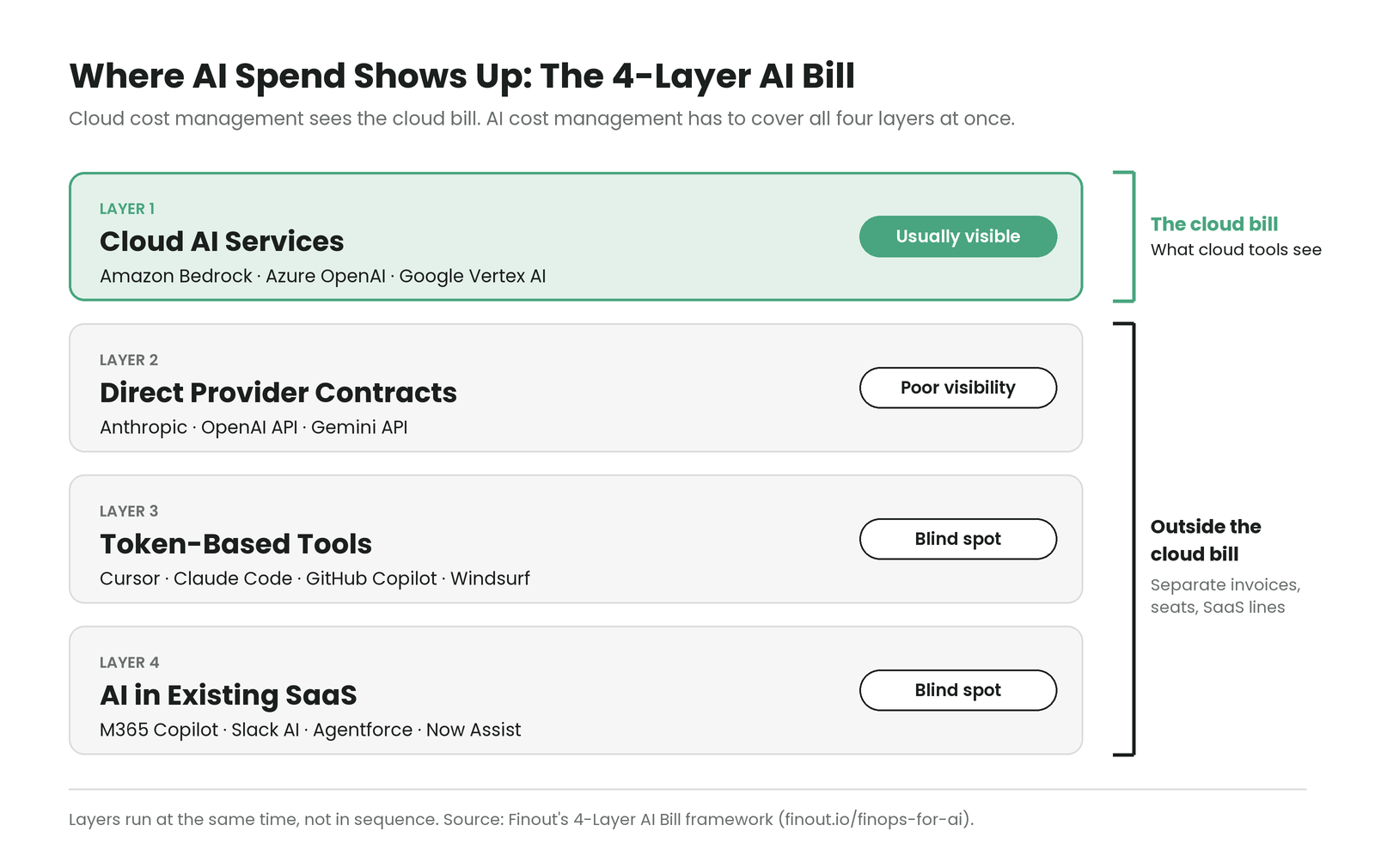
Layers 3 and 4 are also where shadow AI lives. Shadow AI is AI usage nobody approved or tracks, like a personal API key or an AI add-on switched on in a SaaS tool. For ways to surface it, see these AI cost visibility strategies.
What Stays the Same: One FinOps Practice, Overlapping Scopes
None of this calls for a second discipline. FinOps is still the operating model, and AI cost management is FinOps applied to AI spend.
The FinOps Framework treats AI as a technology category of spend, managed through Scopes. In the FinOps Framework, a Scope works like a lens. It's a defined set of technology spend you look at together because it supports a specific business outcome.
You don't need a new Scope for every AI dollar. Per the FinOps Framework's AI category, "Not all AI spending must come into a new scope."
Scopes can also overlap. Amazon Bedrock usage sits inside your AWS bill, which means it can belong to your existing cloud Scope and a new AI Scope at once. When that happens, say it out loud, and decide which Scope owns which decision.
Skip that step, and the same dollars get budgeted, reported, or optimized twice. The fix starts with the business question, not the spend.
A question like what are we spending on AI often turns out to be about something else. The real question might be whether you're investing in the right AI infrastructure for your key product teams. That second question tells you which Scope you need, if any.
The billing data is converging too. FOCUS, the FinOps Open Cost and Usage Specification, is an open standard for formatting billing data the same way across providers.
Per the FOCUS 1.4 release notes, "FOCUS 1.5 is scoped to surface AI model identity and token consumption (input and output) in the Cost and Usage dataset." FOCUS 1.4 itself, ratified June 4, 2026, doesn't add token columns, and the notes give no release date for 1.5.
How Each FinOps Capability Changes for AI
The capabilities are the same ones you run for cloud. The inputs change, and with them, how each capability works day to day.
Allocation: From Resource Tags to Usage Metadata
Allocation means assigning each cost to the team, product, or customer that caused it. In cloud, you tag a resource when it's created, and the tag follows its costs.
AI provider calls often carry no native tags. Allocation leans on what the call does carry: API keys, projects, workspaces, request metadata, and user identity. Rule-based mapping in your FinOps system turns those handles into owners.
Shared AI infrastructure needs split rules too. An AI gateway or embedding pipeline serving five teams needs a rule for dividing its cost, just like a shared Kubernetes cluster. For the full method, follow this step-by-step GenAI cost allocation guide.
Andy Wortman, Senior DevOps Engineer at Qventus, describes the before and after in the Qventus customer story. "We can see how our costs grow when we go live with a new customer. That was a big thing that we couldn't tell before because it all gets rolled up into one giant bill."
That was a cloud allocation outcome. An AI provider invoice is the same giant bill, and it needs the same treatment. Once AI spend has owners, showback, unit economics, and budgets all have something to stand on.
Forecasting and Budgets: Shorter Windows, Wider Ranges
Cloud forecasts mostly extrapolate a steady baseline: last quarter's compute, plus growth. AI forecasts need to model the drivers underneath the spend.
Those drivers are request volume, tokens per request, model mix, and cache hit rate. Cache hit rate is the share of prompt input served from a cache of content the model has already processed.
The FinOps Framework's AI page warns that new technology areas bring more forecast variance and need shorter forecasting windows. Revisit AI forecasts monthly, and again whenever a team changes models.
Budget by use case and owner, not by provider. A support chatbot and a code assistant may share a provider and still need different budgets, because they support different decisions.
Optimization: From Rightsizing to Model Fit and Cache Hit Rate
Cloud optimization trims the resource: you rightsize it, schedule it, or commit to it. AI optimization trims the work each model call does.
The main AI lever is model routing, which sends simple tasks to smaller models. Then come trimming prompts and context, caching repeated input, batching jobs that aren't urgent, and capping output length. For more detail, see six ways to reduce AI costs.
Finout's FinOps for AI page lists four signals that expose an outlier team or workload:
- Model fit: A large model on trivial tasks, where a small model would do, is the most common waste.
- Cache hit rate: Low cache reuse means you're paying full price for prompts you've already run.
- Input/output token ratio: Bloated context windows and runaway generations show up here first.
- Cost per outcome: Spend per commit, request, or resolved ticket ties cost to something the business recognizes.
Each lever moves something downstream. A broken cache raises input tokens per request, which raises cost per request and cuts the margin on that feature. If the feature is priced to customers, the cache problem is now a pricing problem.
Unit Economics: From Cost per Resource to Cost per Outcome
Cloud unit metrics, like cost per customer or per transaction, still apply to AI. AI adds new units: cost per request, cost per agent run, and cost per resolved ticket.
Cost per token is useful for comparing models. It's a normalizer, though, and it can't tell you whether the spend paid off.
A better frame is tokenomics, the economics of token-based AI. The guide to tokenomics for FinOps practitioners describes it as governing how capital and infrastructure are converted into AI tokens, consumed efficiently, and tied to business value.
That gives you three questions to ask of any AI workload: what each token costs to produce, how efficiently you consume it, and what it returns. In Finout's view, FinOps optimizes the infrastructure, while tokenomics optimizes the outcome of each token across its full life.
What Does This Mean in Practice?
Where you start depends on where your AI spend sits today. Each step below matches a common starting point.
- Layer 1: If most AI spend is Bedrock or Vertex AI, prioritize per-model allocation and anomaly views, because the data sits on your cloud bill.
- Direct contracts: If you pay Anthropic or OpenAI directly, ingest those invoices before forecasting, because a forecast missing an invoice starts wrong.
- Developer tools: If seats for Cursor or GitHub Copilot are growing, allocate seats and usage by user identity, because identity is the clearest owner signal.
- Provisioned capacity: If you're considering reserved capacity, keep terms short unless you won't switch models, because reservations can lock you to one model.
- Finance questions: If finance asks "What are we spending on AI?", find the decision behind the question first, because that decides what you report.
Every one of these steps raises the same next question. Who owns this spend, and what is it buying?
What Does This Mean for FinOps, Engineering, and Finance?
The practice is shared, but each role carries a different part of it. Here's what changes for each.
For FinOps teams, AI adds Scope overhead. Create a new Scope only when a distinct business outcome or constraint requires it. Let it fade once that outcome is met, because every extra Scope adds upkeep you'll feel later.
For engineering, argue in output metrics. Cost per GPU hour describes what you paid for hardware, while cost per token delivered and cost per outcome describe what it produced. The inference stack decides how much capacity becomes delivered tokens, which means sticker price can't settle a production decision.
For finance, AI is a business model question. Selling AI features, building AI-native products, and using AI internally each imply a different cost structure. If your own pricing moves from seats toward consumption, revenue predictability changes along with cost.
How Finout Manages AI and Cloud Costs in One Place
Finout's positioning is that AI spend should be treated like cloud spend: normalized, allocated, and governed from one place. Finout allocates AI spend at per-token, per-model, per-team, and per-agent granularity, with 100% cost allocation.
- FinOps for AI: Brings all four layers of the AI bill into one view, with native ingestion for Bedrock, Vertex, Azure OpenAI, OpenAI, and Anthropic. Alerts can track cost per million tokens, not just total spend, which catches a pricier model mix even when volume looks flat.
- Billy: Answers plain-English cost questions from live Finout data, like what drove this week's AI spike across OpenAI, Anthropic, or Vertex AI.
- FinOps Agents: Uses Detection, Investigation, and Orchestration agents to detect waste, investigate root cause, and route approved actions to Jira, Slack, or ServiceNow.
- FinOps for Agents: Lets your agents, like Claude or Cursor, query Finout's governed data layer through the MCP server, with RBAC, SSO, and SOC 2.
Billy answers and advises, following Finout's principle: "Rules act. AI advises."
FinOps Agents builds in audit and verification, and its permissions grow in steps: "Read-only on day one. Tickets when you're ready. Remediation when you ask."
The platform underneath handles the allocation and control work that managing AI spend depends on.
- MegaBill: Gives you one normalized bill for cloud and AI spend. AI costs can be filtered, allocated, and reported with the same rules as the rest of your infrastructure.
- AI-Powered VTags: Scans names, labels, accounts, and metadata to propose Virtual Tag rules, and only rules you approve allocate costs.
- Shared Cost: Reallocates shared expenses, like shared databases and data transfer, with telemetric-based or custom rules in single and multi-tenancy settings.
- Anomaly Detection: Uses ML-powered detection plus custom anomalies with tailored rules and thresholds. Tracks spikes by individual, team, application, or environment, with real-time Slack or email alerts.
- Financial Planning: Builds hierarchical plans with forecasts from historical data and seasonality adjustments. Tracks budgets by feature, team, or segment, synced in real time with actual costs.
Want to see where your AI spend sits across all four layers? Book a demo.

.svg)




