











![Kubecost: Pros/Cons, Pricing, Tutorial & Alternatives [2026 Guide]](https://8840961.fs1.hubspotusercontent-na1.net/hub/8840961/hubfs/Cons%2c%20Pricing%2c%20Tutorial.png?length=452&name=Cons%2c%20Pricing%2c%20Tutorial.png)
What Is IBM Kubecost?
IBM Kubecost is a cost monitoring and optimization solution tailored for Kubernetes environments. It helps organizations track, allocate, and manage infrastructure expenses at a granular level, including per namespace, deployment, service, or label. By providing real-time visibility into cost trends and breaking down resource consumption, Kubecost allows teams to identify high-spend workloads and potential areas for savings within Kubernetes clusters.
Beyond cost reporting, Kubecost integrates directly with cloud providers’ billing APIs, ingesting usage and price data to deliver comprehensive insights. This integration enables companies to optimize resource allocations, rightsize infrastructure, and automate budget enforcement, ensuring cloud-native operations remain both efficient and cost-effective.
Related content:
-
Read our guide to Kubecost Vs OpenCost
IBM Acquisition of Kubecost: What Does It Mean?
IBM’s acquisition of Kubecost reflects its focus on infrastructure cost optimization across hybrid and multicloud environments. This move follows a pattern of FinOps-related acquisitions, including Apptio in 2023, Turbonomic, and Instana in prior years.
Kubecost brings to IBM a widely adopted solution for Kubernetes cost monitoring, used by enterprises like Audi, GitLab, and Rakuten. The tool provides visibility into Kubernetes spending and is built on OpenCost, an open source project under the Cloud Native Computing Foundation. By integrating Kubecost and OpenCost into its FinOps Suite, which already includes Cloudability and Turbonomic, IBM aims to offer more granular, Kubernetes-native cost insights alongside broader cloud and infrastructure optimization capabilities.
However, the acquisition raises serious concerns about Kubecost’s long-term independence and roadmap clarity. Users of the open-source OpenCost project may worry about IBM’s influence on governance or future prioritization of enterprise features over community needs. Additionally, the possibility of tighter integration with IBM Cloud or bundling into IBM’s broader offerings could reduce flexibility for teams seeking a lightweight, vendor-neutral cost monitoring solution. These changes introduce uncertainty for existing users, especially those relying on self-managed or open-source deployments.
Key Features of Kubecost
IBM Kubecost offers a focused set of capabilities to help organizations control and optimize Kubernetes spending. Designed specifically for cloud-native environments, it brings together cost visibility, real-time insights, and optimization tools in a single platform.
The solution’s key features include:
- Real-time cost visibility: Track Kubernetes costs in real time across clusters, teams, and environments. Kubecost provides detailed breakdowns by namespace, service, or label.
- Unified cost monitoring: Combine in-cluster resource usage with external cloud services to get a complete picture of spend. Kubecost integrates with AWS, GCP, and Azure billing APIs.
- Granular cost allocation: Allocate costs accurately across teams, products, or workloads using native Kubernetes concepts. This supports showback and chargeback models with reconciled data from actual cloud bills.
- Optimization recommendations: Get tailored insights to reduce waste and rightsize infrastructure. Kubecost suggests actions dynamically based on your environment.
- Alerts and budget governance: Set budgets and receive real-time alerts when thresholds are approached or exceeded. The solution also supports automated reporting and configurable alerts.
- Open-source ecosystem integration: Built for Kubernetes from the ground up, Kubecost integrates natively with Prometheus, Grafana, and other tools in the cloud-native stack.
- Fast deployment: Kubecost is easy to install, allowing teams to begin monitoring spend with minimal setup. It runs within your environment, keeping data private.
Key Kubecost Limitations
While Kubecost provides strong visibility and Kubernetes cost optimization, there are several limitations that users should be aware of. These constraints can impact accuracy, scalability, and ease of use, especially in larger or more complex environments.
- No support for non-Kubernetes assets: Kubecost only tracks costs within Kubernetes clusters. It lacks native support for monitoring or optimizing external cloud assets like databases, storage buckets, or serverless services.
- Daily cost granularity: Cost data is only available at the daily level. This limits visibility into short-term usage spikes, which can be critical for managing dynamic workloads and auto-scaling environments.
- Limited free tier accuracy: The free version of Kubecost uses estimated AWS list prices, rather than actual billing data. This can lead to discrepancies between reported and real costs, particularly for users relying on spot instances or custom pricing agreements.
- Scalability in large environments: Handling cost data across large-scale or multi-cluster environments can be difficult. Even in paid tiers, some users report performance bottlenecks or complex setups when scaling Kubecost.
- Documentation and usability gaps
Some users find the documentation insufficient, especially for advanced use cases or self-hosted installations. Alerting and configuration options may also require more maturity. - Manual optimization process: Although Kubecost provides optimization recommendations, acting on them often requires manual intervention. This adds operational overhead for DevOps teams managing multiple environments.
- Limited multi-cloud integration: Kubecost is focused on Kubernetes-specific cost allocation and lacks deep integration with non-Kubernetes services across multiple cloud providers. Teams managing hybrid or multi-cloud environments may need to supplement it with other tools.
Understanding Kubecost Architecture
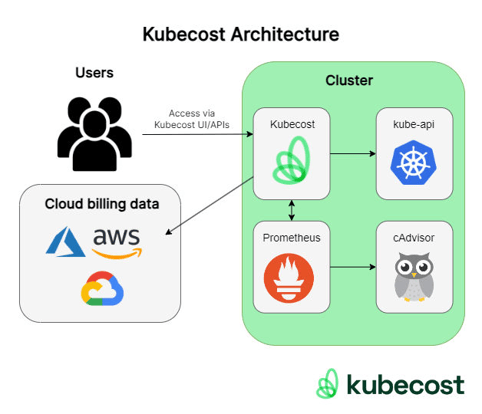
Kubecost's architecture is centered around two main components: the Cost Analyzer pod and Prometheus. These elements work together to collect, store, and process cost and usage data within a Kubernetes cluster.
Source: Kubecost
Cost Analyzer Pod
The Cost Analyzer pod includes two key services: a frontend, which uses Nginx to handle routing, and the cost-model component, which performs cost allocation calculations. This cost-model reads from and writes to Prometheus, ensuring that both real-time and historical cost data are available for analysis.
Prometheus and Optional Components
Prometheus is an essential part of the architecture. It stores time-series metrics related to resource usage and cluster health. Disabling Prometheus renders Kubecost non-functional, as no cost data can be collected or analyzed without it.
There are several optional components which can be added to the cost analyzer pod:
- Kube-state-metrics: provides Kubernetes API metrics like resource requests.
- Node-exporter: Contributes metrics used for reserved instance recommendations and cluster health dashboards.
- Alertmanager: Enables the configuration of custom cost and health alerts.
- Network costs: Can be enabled to track network egress expenses.
- Grafana: can be used to display prebuilt dashboards that visualize cost and performance metrics.
Integration with Cloud Billing
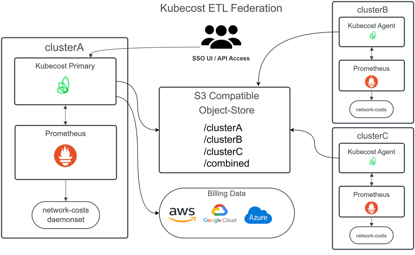
Kubecost also supports integration with cloud provider billing systems to reconcile in-cluster data with actual spend. This includes on-demand and negotiated pricing rates, spot pricing data (for AWS), and exports from cloud billing services like AWS Cost and Usage Report, Azure Cost Export, and Google BigQuery.
Source: Kubecost
For production use, the architecture can be extended further, especially in enterprise environments using federated setups for centralized reporting.
Kubecost vs. OpenCost
Kubecost is a commercial product that provides out-of-the-box capabilities, advanced optimization, alerting, and reporting, along with enterprise-level features such as SSO, RBAC, and multi-cluster management.
OpenCost is an open source project, originally spun out of Kubecost but now belonging to the Cloud Native Computing Foundation (CNCF), focused strictly on standardized, transparent Kubernetes cost allocation without the advanced commercial tooling or vendor support.
Enterprises choosing between the two often weigh ease of use and vendor support against flexibility and openness. Kubecost is suited for organizations that want a turnkey solution with robust reporting and automation, while OpenCost suits teams seeking a customizable, community-driven approach. As OpenCost continues to evolve through CNCF stewardship, the gap in features may narrow, but Kubecost currently leads in operational maturity.
Kubecost Pricing Models Explained
Kubecost’s pricing structure is divided into three main tiers: Foundations, Enterprise Self-Hosted, and Enterprise Cloud. Exact pricing is not publicly available and can be requested from IBM.
Foundations (Free Tier)
This tier is designed for individuals or small teams needing basic cost visibility. It supports unlimited clusters up to 250 cores, with 15-day metric retention and unlimited users. Features include integration with major cloud providers and basic cost reconciliation and optimization tools, making it suitable for evaluation or non-critical workloads.
Enterprise Self-Hosted
The self-hosted enterprise tier expands on the free tier with support for unlimited cores and clusters, unlimited metric retention, and advanced features like role-based access control (RBAC), custom pricing models, and enterprise integrations. Organizations are responsible for managing the deployment, which allows full control over updates, security, and data residency. This option fits teams with existing infrastructure management capabilities that need maximum flexibility.
Enterprise Cloud (SaaS)
This fully managed tier includes all self-hosted features while offloading operational overhead to Kubecost. It provides a dedicated domain, built-in scaling, automated updates, and managed availability and disaster recovery. It also supports identity provider integration for enterprise authentication. The SaaS model is aimed at teams prioritizing ease of deployment and maintenance.
Self-Hosted vs. Cloud-Hosted Tradeoffs
Self-hosting gives organizations complete control but requires internal resources for scaling, security, and maintenance. Cloud-hosted deployments are easier to manage and faster to deploy but come with reduced control and typically higher recurring costs. Teams must weigh operational responsibility against convenience and flexibility when selecting a deployment model.
AWS Marketplace Options
Kubecost is also available through AWS Marketplace with flexible, pay-as-you-go pricing. This model is based on usage, such as per container-hour rates, and supports dynamic scaling without long-term commitments. Annual contracts are available for teams looking to lock in pricing or consolidate billing.
Quick Tutorial: Getting Started with Kubecost Self-Hosted
Installing Kubecost Self-Hosted is straightforward and can be done in several ways, depending on your operational needs and tooling preferences. The recommended method uses the Kubecost Helm chart, which supports both Kubecost and OpenCost community features.
The tutorial instructions below are adapted from the Kubecost documentation.
1. Installation with Helm Chart
To begin, install the Helm chart using the following command:
helm upgrade --install kubecost \
--repo https://kubecost.github.io/cost-analyzer/ cost-analyzer \
--namespace kubecost --create-namespace
This installs Kubecost into the kubecost namespace and provides default configurations suitable for most environments. It does not generate a product token for managing tiers or upgrades, but it provides access to core functionality for cost monitoring and optimization.
For more customized deployments, you can use the helm template command to generate a local YAML manifest:
helm template kubecost \
--repo https://kubecost.github.io/cost-analyzer/ cost-analyzer \
--namespace kubecost --create-namespace \
-f your-custom-values.yaml > kubecost.yaml
kubectl apply -f kubecost.yaml
This method offers more control over the configuration but requires managing the full deployment lifecycle manually.
If you're only interested in open-source cost allocation without enterprise features, you can deploy the OpenCost project directly. This setup provides the base cost model but lacks UI components and integrations like cloud billing, SSO, or RBAC.
2. Configuration
Kubecost supports passing configuration options at install time to streamline setup. These values are defined under kubecostProductConfigs in a values file and passed to Helm:
kubecostProductConfigs:
productKey:
key: "your-key"
enabled: true
You can also set individual values directly using --set flags:
helm install kubecost cost-analyzer \
--repo https://kubecost.github.io/cost-analyzer/ \
--namespace kubecost --create-namespace \
--set kubecostProductConfigs.productKey.key="your-key" \
--set kubecostProductConfigs.productKey.enabled=true
3. Enabling External Access
To access the Kubecost UI externally, you need to expose port 9090 on the kubecost-cost-analyzer service. This can be done using an ingress controller, such as NGINX or AWS ALB, or by using port-forwarding for local access.
For typical ingress deployments, the Helm chart includes an ingress template. For example:
ingress:
className: nginx
enabled: true
hosts:
- kubecost.your.com
tls:
- hosts:
- kubecost.your.com
secretName: kubecost-tls
TLS, basic authentication, and non-root path access are also supported via standard Kubernetes ingress annotations.
4. Updating and Removing Kubecost
To upgrade Kubecost to the latest version:
helm repo update && helm upgrade kubecost kubecost/cost-analyzer -n kubecost
To uninstall:
helm uninstall kubecost -n kubecost
Notable Kubecost Alternatives
1. Finout

Finout is an enterprise-grade FinOps platform that provides a unified "MegaBill" to manage Kubernetes costs alongside all other cloud and SaaS expenses (such as Snowflake, Datadog, and OpenAI). Unlike tools that require heavy in-cluster agents, Finout leverages existing monitoring data from Prometheus or Datadog to provide 100% cost allocation without changing code or adding operational overhead.
Key features include:
- MegaBill consolidation: Combines multi-cloud billing (AWS, GCP, Azure) with Kubernetes and SaaS costs into a single, granular view for total COGS visibility.
- AI-powered Virtual Tagging (VTags): Allows teams to create business-aligned cost centers (e.g., by feature, customer, or department) using logic and metadata without needing to touch the underlying infrastructure.
- CostGuard optimization: Automatically scans Kubernetes clusters to identify CPU and memory waste, providing actionable rightsizing recommendations and simulating potential savings.
- Agentless Kubernetes monitoring: Connects directly to your existing Prometheus or Datadog setup via a native integration, eliminating the need for complex, proprietary agents.
- Advanced shared cost reallocation: Distributes unallocated or shared costs—such as idle cluster capacity or support fees—proportionally across teams based on actual consumption.
- Unit economics tracking: Links cloud spend to business value by tracking KPIs like "cost per active user" or "cost per transaction."
2. CAST AI

CAST AI is a Kubernetes automation and optimization platform to reduce cloud costs and operational overhead by managing infrastructure. Unlike traditional monitoring tools, it implements automated resource scaling, scheduling, and spot instance orchestration.
Key features include:
- Automated cluster optimization: Continuously adjusts resource allocations using real-time bin packing and pod placement to eliminate waste and improve utilization.
- Zero-downtime live migration: Moves running workloads between nodes without interruption, supporting even stateful and long-running applications.
- Commitment utilization: Optimizes usage of cloud commitments across clusters to maximize savings and minimize unused capacity.
- Spot instance automation: Manages the lifecycle of spot instances, handling interruptions and fallback automatically to maintain reliability.
- Bin packing and node consolidation: Frees up underutilized nodes by intelligently consolidating workloads, reducing unnecessary compute costs.
3. nOps

nOps is an automation and optimization platform for Amazon EKS that continuously rightsizes containers, tunes autoscaling, and maximizes cost efficiency across compute purchase models. Designed to operate alongside existing Kubernetes autoscalers such as Karpenter or Cluster Autoscaler, nOps selects the most cost-effective instance types.
Key features include:
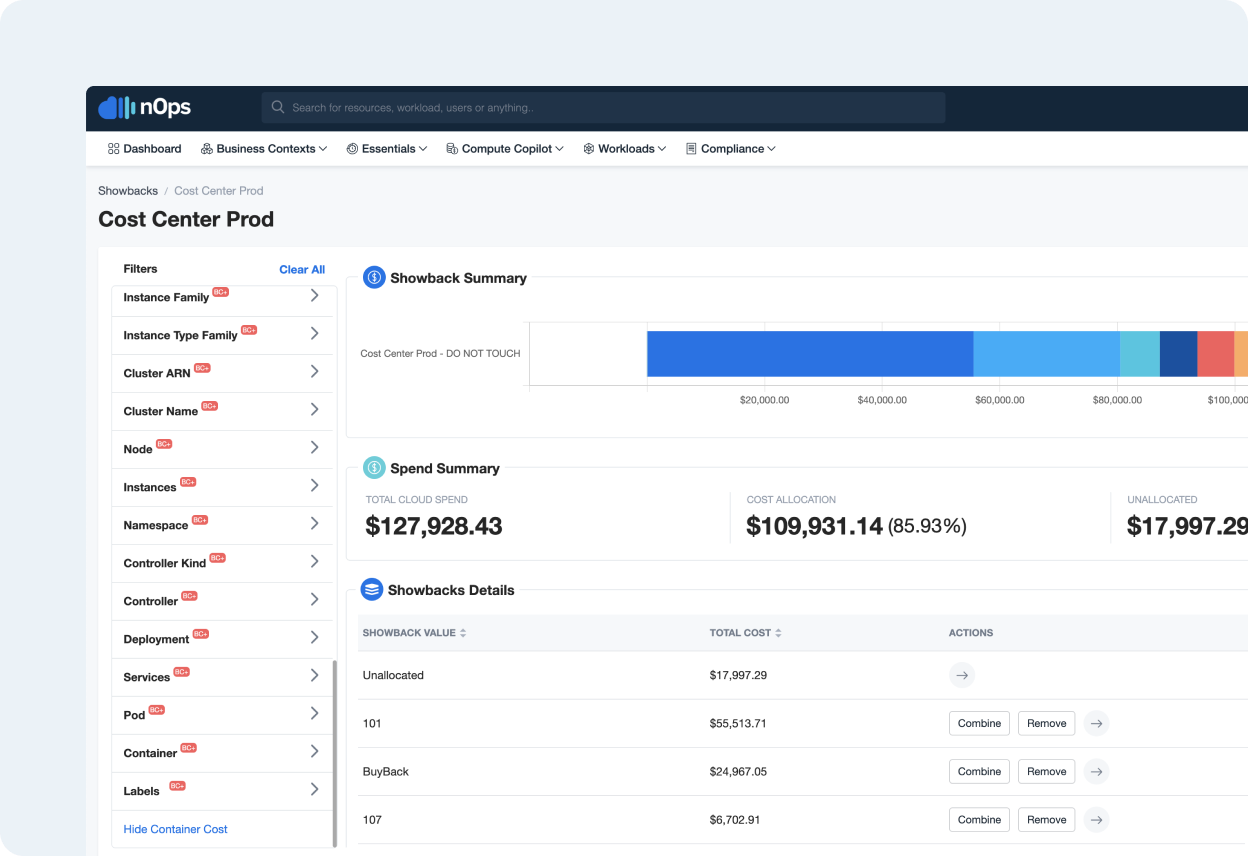
- Dynamic container rightsizing: Automatically detect and fix overprovisioned pods using multidimensional autoscaling. Adjust thresholds for performance or cost priorities and apply optimizations across jobs, deployments, daemon sets, and stateful sets.
- Automated cluster configuration optimization: Continuously tune EKS configurations and select instance types (Spot, On-Demand, or commitments) based on workload demand.
- Instance selection: Works with Karpenter or Cluster Autoscaler, automatically choosing optimal instance types without requiring migration or lock-in.
- EKs visibility: Gain visibility into cluster costs, efficiency, and potential savings. Access benchmarking for cost and performance, as well as node-level usage insights.
- Workload optimization: Continuously re-evaluate workloads and rebalance resources for maximum performance and price efficiency, leveraging automation to eliminate manual tuning.
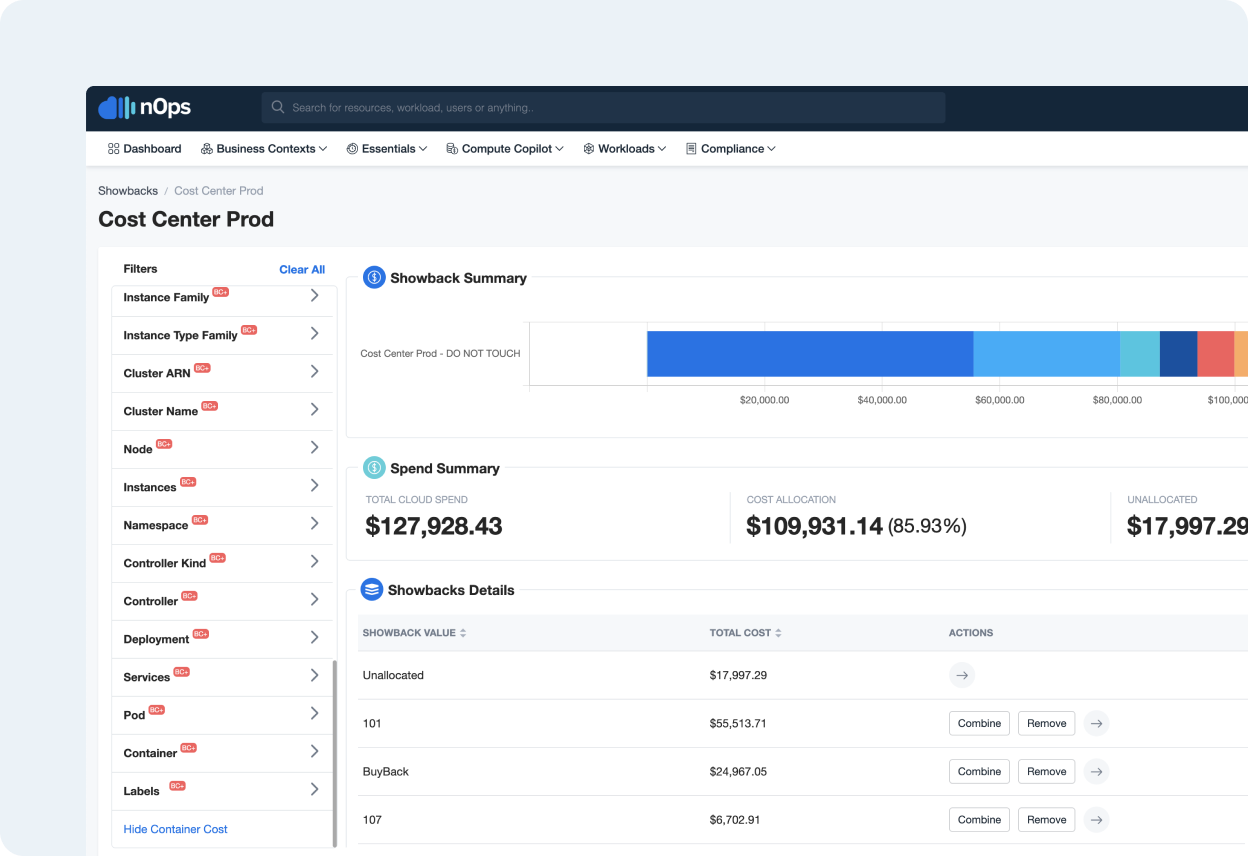
Source: nOps
4. PerfectScale

PerfectScale is a Kubernetes optimization platform that delivers continuous rightsizing across multi-cluster, multi-cloud environments. Intended to work with existing DevOps workflows, it uses AI-driven analysis to understand application demand patterns and ensure optimal resource allocation at all times.
Key features include:
- AI-guided optimization: Uses analysis of real-time and historical workload behavior to continuously adjust resource allocations and eliminate misconfigurations.
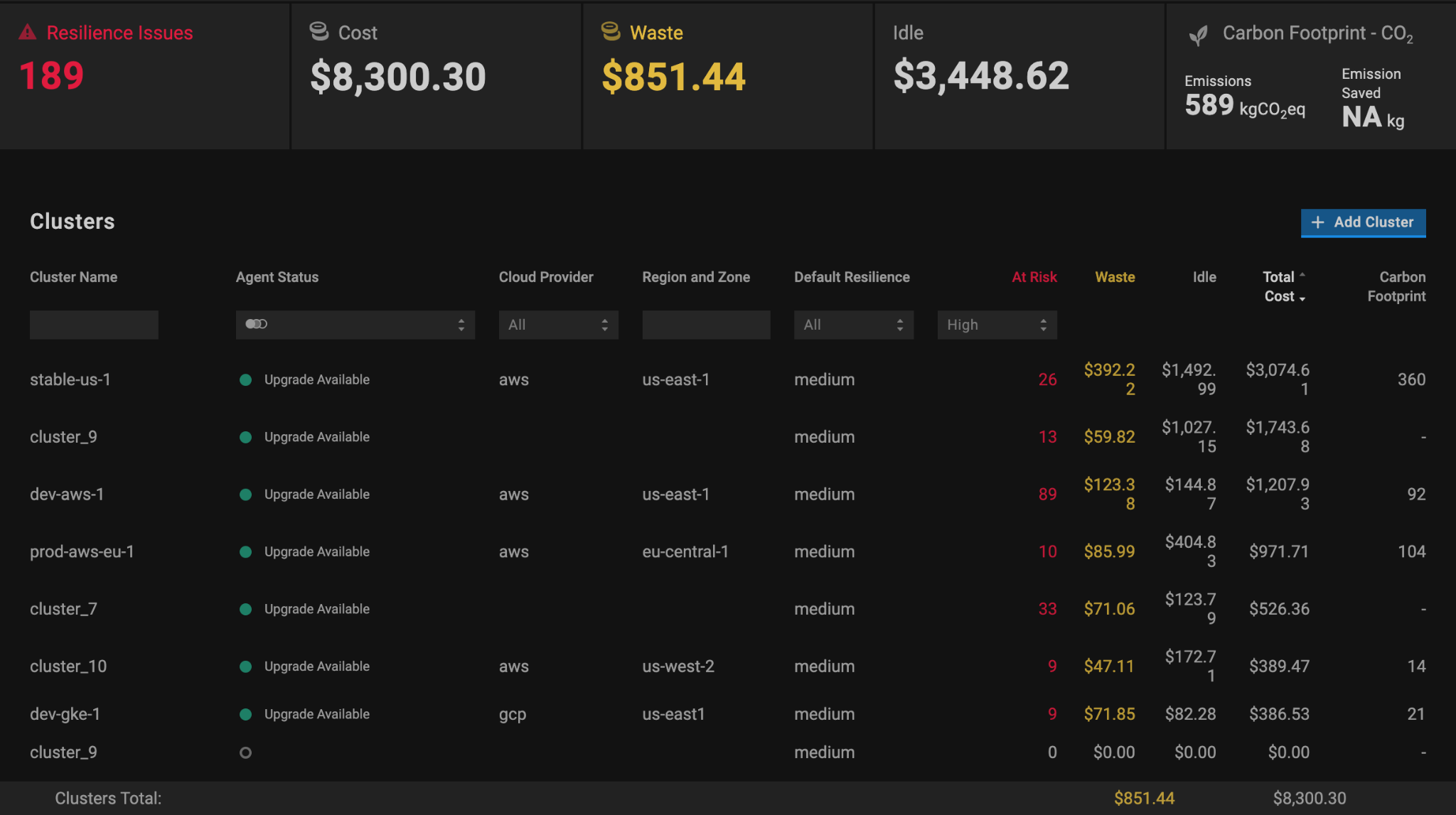
- Multi-cluster, multi-cloud visibility: Provides a centralized view of Kubernetes environments, allowing teams to drill into specific clusters, services, or containers to identify cost and performance issues.
- Well-Architected Framework compliance: Supports four core pillars (performance efficiency, reliability, cost-effectiveness, and sustainability) to align optimization with industry best practices.
- Trend analysis: Tracks usage and cost trends over time to uncover seasonality, anomalies, and the impact of changes on performance and spend.
- Workflow integration: Enables execution of optimization recommendations by turning them into tickets, pull requests, or automated configuration updates.
Source: PerfectScale
Conclusion
As Kubernetes adoption grows, managing cost and resource efficiency across dynamic, containerized environments becomes increasingly complex. Enterprise-grade Kubernetes cost optimization tools address this by providing real-time visibility, granular allocation, and actionable insights to control spend at scale. By integrating with cloud billing systems and offering native observability within clusters, these solutions enable engineering, finance, and operations teams to collaborate effectively on FinOps goals.

.svg)