

















Key Takeaways
- Direct answer: To allocate Anthropic, OpenAI, and GPU spend to teams and features, combine provider accounts, request metadata, and GPU data in one model.
- Why it matters: Allocation is what lets finance answer what an AI feature costs and whether it earns that cost.
- Central principle: Charge each team the effective rate, meaning the price actually paid after caching, batch, and channel differences, instead of the list price.
- Starting point: Split provider accounts along team and product lines before you write a single allocation rule.
What Does It Mean to Allocate AI Spend to Teams and Features?
You allocate Anthropic, OpenAI, and GPU spend by mapping every charge to the team, feature, or customer that caused it. Provider accounts and keys tell you which team spent the money. Your own request metadata tells you which feature, and GPU usage data splits shared hardware.
Each provider gives you a few identity handles to work with. A workspace is Anthropic's container for separating usage inside one organization, and a project is OpenAI's version of the same idea. An API key is the credential an application sends with each request, and providers record usage against it.
Allocation is one of the capabilities defined in the FinOps Framework. The FinOps Allocation capability describes strategies to "assign and share cost and usage using accounts, tags, labels," creating team accountability and supporting showback, chargeback, and budgeting. A cost without an owner is just a number on an invoice.
Start from the business question instead of the invoice. Leadership rarely asks what you spent on Claude last month. They ask whether AI investment is landing in the right products and teams, and which features earn their AI cost.
Treat AI cost as a chain with three links. Production is what a token costs to make, set by model, channel, and hardware. Consumption is how efficiently a feature uses tokens, and value is what the feature returns.
Change one link and the others move. A broken cache raises cost per feature, and that can reach the price you charge customers.
Why Is AI Spend Harder to Allocate Than Cloud Spend?
Cloud allocation leans on resource tags and accounts. AI spend breaks that habit in five ways.
- No resource tags on API spend: Anthropic's usage reports group usage by workspace and API key, and cost by workspace (verified October 2026). OpenAI's cost data groups by project and API key, with no resource tags in either case (verified October 2026).
- Same model, many channels: Claude bought from Anthropic directly and through Amazon Bedrock, AWS's managed model service, arrives under different identifiers and rates.
- One request, many calls: Per Anthropic's agentic loop docs, "every tool call is a round trip" (verified October 2026). An agent repeats that loop until the task is done, turning one user prompt into a chain of model and tool calls.
- Shared GPU capacity: A GPU node's hourly cost belongs to whichever workloads used it, and nobody's name is on the idle hours.
- Tokens are not the whole bill: Orchestration, retrieval, evaluations, and agent session runtime sit outside the token line but still belong to the feature.
Finout, an enterprise-grade FinOps platform for cloud and AI spend, built its Canonical AI Taxonomy to handle the channel problem. Its Model Channel tag lets you compare spend on the same model across billing paths and see whether you pay different rates for it.
AI Spend Allocation at a Glance
This table compares Anthropic, OpenAI, Bedrock, and GPU spend by billing unit, attribution handle, finest grain, and what you still add (verified October 2026).
| Spend source | How it bills | Native attribution handle | Finest grain | What you still add |
|---|---|---|---|---|
| Anthropic API | Tokens, plus session runtime for managed agents | Workspace, API key, model, service tier | Daily cost report; usage within about 5 minutes | Feature and customer |
| OpenAI API | Tokens | Project, API key, user, line item | Daily buckets | Feature, customer, and model name parsed from the line item |
| Claude and other models on Bedrock | Tokens inside the AWS bill | Application inference profile tags | Per usage type per day, never per request | Feature-level detail |
| GPU compute | GPU hours on nodes, busy or idle | Pod, namespace, and container labels from telemetry | Per pod, namespace, and container | Idle-cost policy and conversion to dollars |
What You Need Before You Start
Most allocation projects stall on missing inputs. Gather these five first.
- An ownership taxonomy: Teams, product features, customers, and environments, kept in one source of truth such as a service catalog or HR system.
- Admin access to billing data: An Anthropic Admin API key, an OpenAI admin key, and the AWS Cost and Usage Report (CUR) for Bedrock.
- A request metadata standard: Fields such as
feature_id,customer_id,team, andenvironmentattached to every model call. - GPU telemetry: Per-pod GPU usage metrics (a pod is the smallest unit Kubernetes runs) on every GPU node.
- An agreed shared-cost rule: A method for splitting gateways and shared GPU time, signed off by finance before the first report goes out.
An admin key is an organization-level credential for reading billing and usage data. It is separate from the keys your applications use to send requests.
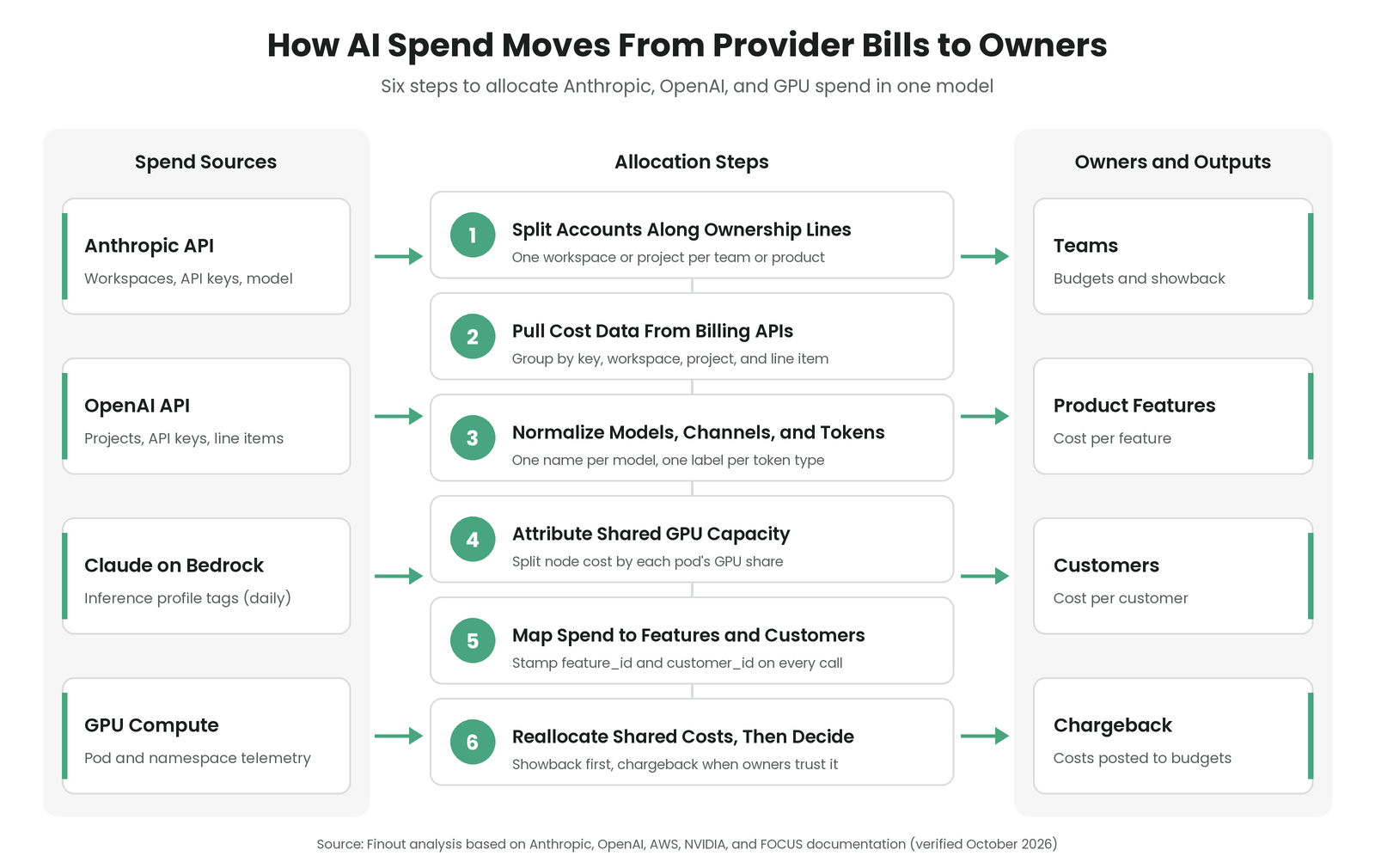
How to Allocate Anthropic, OpenAI, and GPU Spend: A Six-Step Process
The first two steps use what providers already give you. Step 3 makes that data comparable across providers.
Steps 4 and 5 add what only you know: who used shared GPUs and which feature made each call. Step 6 decides whether money actually moves.
Step 1: Split Provider Accounts Along Ownership Lines
Provider accounts give you team-level attribution with no new tooling. Set them up along ownership lines first.
The Claude workspaces docs say: "Use workspaces to separate different projects, environments, or teams while maintaining centralized billing and administration" (verified October 2026). Create one workspace per team or product, with a separate API key per service inside it.
Keep production traffic out of the Default Workspace. On Default Workspace limits, Anthropic's docs say "You cannot set limits on the Default Workspace" (verified October 2026). Spend left there also has no team owner.
Do the same with OpenAI projects, one project per team or product, because OpenAI's cost data can be grouped by project (Step 2). Every extra workspace or project is one more boundary to maintain. Create one when a team or product needs its own budget.
For Claude on Bedrock, the tagging handle is an application inference profile, a named, taggable resource your code calls in place of the base model. Per AWS's Bedrock application inference profiles guide, "The finest grain is per usage type per day; they do not produce per-request cost," and cost allocation tags are not retroactive (verified October 2026). Create and tag each profile before launch, because spend from before tagging stays untagged.
Then map every key, workspace, project, and profile to an owner in your taxonomy instead of splitting the invoice by headcount. The four-step AI agent allocation framework shows how to tie each key or seat to your HR team list.
Step 2: Pull Cost Data From Each Provider's Billing API
Next, pull cost data on a schedule through each provider's admin-only APIs.
The Anthropic Usage and Cost API lets you "Filter by API key, workspace, model, service tier," and then group results by those same dimensions (verified October 2026). Per Anthropic's cost report timing, the cost report uses daily buckets, usage typically appears within about 5 minutes of a request, and Priority Tier costs are not included in the cost endpoint (verified October 2026). If a team uses Priority Tier, reconcile its costs separately against your invoice.
For grouping, the OpenAI Costs API states: "Supported fields include project_id, user_id, line_item, api_key_id, and api_source," with results in daily buckets (verified October 2026). A line item is the text label on each billed charge. The model name sits inside that label, and you have to parse it out.
If you would rather not maintain scripts, Finout's Anthropic integration connects with an Admin API key, refreshes daily, and backfills history. It shows model, token type, feature, and team, with input, output, and cache tokens next to every dollar.
Finout's OpenAI integration pulls the Org Costs API and Codex Enterprise data into one cost center, refreshed daily. An OpenAI Origin dimension tags each row as Platform or Codex. Seat fees are not included.
Step 3: Normalize Models, Channels, and Token Types
Every provider names models and token operations its own way. Normalize before you allocate, or one feature's Claude spend splits across three different names.
FOCUS, the FinOps Open Cost and Usage Specification, is a shared column format for billing data across vendors. FOCUS for AI says AI usage resembles cloud and SaaS consumption but "adds abstracted meters not tied to hardware: tokens, API calls, and outcomes." In FOCUS terms, a count of tokens is a consumed quantity with a consumed unit, like any other meter.
Finout's Canonical AI Taxonomy normalizes Model Brand, Family, Name, Channel, Lifecycle, and Token Type across AWS, GCP, Azure, Anthropic, OpenAI, and Cursor. The tags cover model invocation charges only, leaving out Guardrails, agent runtime, and tool-use fees. Text, image, speech, and embedding usage of one model roll up together, and Cursor spend gets no input, output, or cache split.
In practice, group spend by Model Name and Model Channel. The same model at two rates shows up side by side, and you can decide whether a team should switch channels.
AWS's inference profile cost tags flow to AWS Cost Explorer and the Cost and Usage Report, which means Bedrock spend sits inside your AWS bill (verified October 2026). If it already counts toward a cloud budget, decide which budget owns it before AI reports go out, or you will count it twice.
Step 4: Attribute Shared GPU Capacity to the Workloads That Used It
GPU nodes bill by the hour whether they are busy or idle. Accounts and tags stop at the node, while several teams' workloads may share it. The post on why GPU costs break traditional FinOps walks through that failure in detail.
DCGM, NVIDIA's Data Center GPU Manager, is a toolkit for monitoring GPUs in a cluster. With Kubernetes mode on, the NVIDIA DCGM Exporter "Adds pod, namespace, and container labels from the kubelet pod-resources socket." A namespace groups pods by team or app, and the kubelet is the agent that runs on each node.
The exporter adds virtual-GPU attribution only for supported sharing strategies. If workloads share one GPU, confirm your sharing method is supported. DCGM gives you GPU telemetry, never dollars.
To get cost, take each node's hourly price and split it by each workload's share of GPU usage in that hour. Then divide by the tokens or requests each workload served. Cost per GPU hour shows what you paid, while cost per token shows what the hardware delivered.
Decide upfront who owns idle GPU time. The usual options are the platform team, all users in proportion to their usage, or the team that reserved the capacity.
Dedicated nodes are the easy case. If a team has its own GPU nodes, allocate them directly by node label or cloud account.
Step 5: Map Spend to Features and Customers With Request Metadata
Providers know keys and projects. Only you know which feature made the call.
Route calls through a gateway or a thin SDK wrapper. A gateway is a proxy service that sits between your apps and the model providers and forwards every request. Either one can stamp each call with feature_id, customer_id, team, environment, and a trace ID.
A trace ID is a unique ID that stays with a request through every model call an agent chain makes. Without it, a five-step agent run looks like five unrelated calls. For a field-by-field logging setup, see this guide to tracking AI costs per feature.
Then price each feature's tokens at the effective rate. Per Anthropic's pricing page, the Batch API gives "a 50% discount on both input and output tokens," and cache reads cost a fraction of base input while cache writes cost more (verified October 2026). Batch jobs run asynchronously, meaning you submit them now and collect results later.
Claude Managed Agents session runtime costs $0.08 per session-hour and "accrues only while the session's status is running" (verified October 2026). That charge belongs to the feature, and a token-only report will miss it.
Picture two features that send the same number of input tokens. One reads most of its prompt from cache, and the other sends fresh input every time. At list price they look identical, yet at the effective rate the cached feature costs much less.
To check whether a feature pays for uncached input, group its spend by the Token Type tag in Finout's Canonical AI Taxonomy.
Step 6: Reallocate Shared AI Costs, Then Choose Showback or Chargeback
Some AI costs have no single owner. Think of the gateway itself, evaluation pipelines that test model output, shared embedding jobs, shared endpoints, and platform team time. Each one needs a written rule.
- Proportional split: Divide by each team's share of tokens or requests, when you have that telemetry.
- Fixed split: Assign agreed percentages, when usage data is missing or unreliable.
- Even split: Divide equally, only when teams use the shared service in similar amounts.
These are the same shared cost allocation methods teams already use for cloud spend.
Showback means reporting each team's costs back to it without moving money. Chargeback means posting those costs to the team's budget, where they count against its numbers.
Start with showback, which gives owners a chance to dispute the numbers before money moves, and see how IT showback works for the mechanics. Once owners trust the numbers, move production features to chargeback.
How Do You Know Your AI Allocation Is Working?
Allocation is working when the numbers reconcile and owners stop disputing them. Each signal below has a KPI you can track monthly.
| Signal | KPI to track | Healthy trend |
|---|---|---|
| Unallocated AI spend | Share of monthly AI spend with no owner | Falls toward zero month over month |
| Invoice reconciliation | Allocated total compared with each provider invoice | Matches every month, with any gap explained |
| Cost per feature and per customer | Cost divided by feature requests or active customers | Moves with usage instead of at random |
| Token efficiency per feature | Cache hit rate and input/output token ratio | Holds steady or improves after prompt changes |
| Idle GPU ownership | Share of GPU hours idle, with a named owner | Every idle hour lands on a named team |
Unit economics is where allocation pays off. The Bazaarvoice client-level unit economics case study shows what that looks like for AWS spend.
Bazaarvoice allocated 100% of its AWS spend by client. The team cut unit economics build time to 1.5 weeks, down from 4–6 weeks.
Nicolas Guerra, Sr. Cloud FinOps Analyst at Bazaarvoice, put it this way: "Building client-level unit economics in a couple of days was unthinkable before Finout." That result covers AWS spend, and the same order applies to AI spend: owners first, then cost per client.
Common Pitfalls When Allocating AI Spend
These mistakes show up after the first report, when owners start checking the numbers.
Splitting AI invoices by headcount. It feels fair when no usage data exists, but heavy users get subsidized and light users stop trusting the report. Map keys, workspaces, and projects to owners before you publish anything.
Leaving traffic in the Default Workspace or one shared OpenAI project. Teams start there because it already exists, and spend then lands with no owner. Move each service to its own workspace or project before launch.
Charging teams list price. List price ignores caching and batch discounts, which makes efficient teams subsidize wasteful ones. Show each team its cache hit rate next to its effective-rate bill.
Expecting Bedrock tags to apply to past spend. As Step 1 notes, spend from before activation stays untagged and leaves a hole in your trend lines. Create and tag profiles before a launch, and cover older spend with a documented one-time rule.
Treating idle GPU time as nobody's cost. Idle hours then pile up in a platform cost center that grows without review. Name an owner in your shared-cost rule and report idle share every month.
Counting only tokens. Features with heavy retrieval, tool calls, or agent sessions look cheaper than they are. Add vector database costs, tool fees, and agent runtime to each feature with your shared-cost rules.
What Does This Mean in Practice?
If most of your AI spend is one product calling one provider, prioritize workspace and project hygiene. It gives you clean team attribution with no new tooling.
If several features share a gateway, prioritize request metadata. Provider data stops at the API key, and only your metadata reaches the feature.
If you run your own GPU fleet, prioritize per-pod telemetry and an idle-cost owner. GPU hours are a shared cost you control directly, and idle time grows quietly.
If finance wants chargeback this quarter, run one cycle of showback first. A month of disputed reports costs less than a month of disputed budget transfers.
For finance, the payoff is a cost per feature that can support pricing. If you sell an AI feature on usage, that number shapes your margin as well as your budget.
Once allocation holds, ask which features have a cost per outcome you can defend.
How Finout Allocates Anthropic, OpenAI, and GPU Spend in One Place
Finout is an enterprise-grade FinOps platform for cloud and AI spend, built for the agentic era. Finout's core is a business-aligned allocation engine that maps cloud and AI spend to the teams, products, customers, and owners behind it.
FinOps for AI ingests Anthropic, OpenAI, Bedrock, Vertex, and Azure OpenAI natively, with per-token, per-model, per-team, and per-agent granularity. Finout supports AI gateways such as Portkey and LiteLLM and enriches Kubernetes data to GPU, node, and pod level. Efficiency signals sit beside the spend: model fit, cache hit rate, input/output token ratio, and cost per outcome.
Finout's Canonical AI Taxonomy gives every model invocation charge a consistent model name, channel, and token type across supported providers.
AI-Powered Virtual Tags scan names, labels, namespaces, accounts, projects, and metadata to propose allocation rules by team, service, environment, project, or customer segment. You approve, edit, or reject the rules in bulk, and approved rules apply instantly and retroactively. When ownership changes in Backstage, ServiceNow, or Workday, Virtual Tag Sync updates allocation to match.
Billy answers plain-English questions such as spend by team, cost anomalies, or budget vs. actuals. Across OpenAI, Anthropic, and Vertex AI, answers show the provider, model, and cost delta behind a change.
FinOps Agents helps teams detect waste, drift, and anomalies across cloud, Kubernetes, AI, and SaaS, then investigate root cause, blast radius, and ownership. FinOps Agents routes follow-up actions to Jira, Slack, or ServiceNow, with governance, audit, and verification built in.
Finout's hosted MCP server lets you connect Claude, Cursor, or any MCP-compatible client and get cost answers by team, service, or owner. The Model Context Protocol is an open standard that lets AI assistants call outside tools and data. Every agent call respects your existing roles.
The AI capabilities run on the same data as the rest of your cost work:
- MegaBill: Gives you a single, unified view of cloud and AI spend, at any level of granularity.
- Shared Cost: Reallocates shared expenses with telemetric-based or custom rules in single- and multi-tenancy settings.
- Financial Plans: Tracks budgets by any unit, such as feature, team, or segment, with shared cost rules in budget lines.
- Anomaly Detection: Tracks anomalies by individual, team, application, or environment, with alerts in Slack or email.
If you want to see your Anthropic, OpenAI, and GPU spend allocated in one model, Book a demo.

.svg)




