

















Key Takeaways
- What they are: Cloud AI workload costs cover compute, model usage, storage, data movement, platform fees, and the work that surrounds every model.
- Where the money goes: Training spend arrives in bursts, while inference keeps billing for as long as your product runs.
- The central decision: Match each pricing model to the shape of the workload, because every discount comes with a catch.
- Where to start: Allocate spend to owners before you optimize, because some AI spend never appears on the cloud bill.
What Are Cloud AI Workload Costs?
Cloud AI workload costs are everything you pay a cloud provider to train, fine-tune, and serve AI models. That includes accelerator compute, managed model and API usage billed per token or request, storage, data transfer, and managed-platform fees.
Five terms come up constantly:
- GPU (graphics processing unit): A chip that runs many calculations at once, which makes it the standard hardware for AI.
- TPU (tensor processing unit): Google's custom chip, designed for the math inside AI models.
- Training: Teaching a model from data, a job that can run for hours or weeks.
- Inference: The trained model doing its job, such as answering a question or summarizing a document.
- Token: A small chunk of text, often part of a word, that model services count to calculate your bill.
AI cost is bigger than token cost. Tokens are the easiest part to meter, which is why they get most of the attention. Per the FinOps Foundation AI forecasting guidance, "AI systems are made up not only of novel AI-specific services, but 'traditional' compute, storage, database, and networking cost elements."
Why does this matter? AI cost is a chain of production, consumption, and value: what a response costs, how efficiently your product uses it, and what it earns. Change one link and the effect travels to the margin on your AI features.
What Drives Cloud AI Workload Costs?
Most of the bill comes from four drivers. Each one grows with something different, which is why a single budget line rarely explains a change.
Accelerator Compute (GPUs and TPUs)
Accelerator compute is the line most people notice first. Cloud providers bill GPU and TPU instances by the hour, and the meter runs whether the chip is busy or idle.
Kubernetes, the system many teams use to run containers, makes this harder. Google's GKE GPU sharing strategies documentation explains that "Pod manifests must request GPU resources in integers, which means that an entire physical GPU is allocated to one container even if the container only needs a fraction of the resources to function correctly." A pod is the smallest unit Kubernetes schedules, and a small model inside one can hold a full GPU.
That's why price per GPU-hour is a weak guide. Hardware generation and inference software decide how much output each hour delivers. Compare options on cost per million tokens or per request, which a better serving stack can lower on the same hardware.
Model and API Usage
Managed model services such as Amazon Bedrock, Azure OpenAI, and Google Vertex AI bill per token or per request. The provider runs the hardware, and you pay for what the model reads and writes.
Four mechanics decide how big that bill gets:
- Input and output tokens: Providers price the tokens you send and the tokens the model generates separately, often at different rates.
- Reasoning tokens: Reasoning models bill for the thinking steps they run internally, even though the user never sees them.
- Agent loops: One agentic prompt can trigger many model calls as the agent plans, uses tools, and checks its own work.
- Cache hit rate: Providers charge less for cached repeated input, such as a long system prompt, and a broken cache quietly raises the bill.
Storage and Data Movement
Storage grows quietly. Training data, checkpoints, model artifacts, vector stores, and logs pile up long after the job that created them ends.
A checkpoint is a saved snapshot of a model partway through training. A vector store holds embeddings, the numeric versions of your content that retrieval systems search. Egress is the fee for moving data out of a cloud or between regions, and AI pipelines move large datasets often.
Attribute storage to the workload that created it. Otherwise it lands in a shared bucket nobody owns, which is how the AI storage bill becomes the line no one watches.
Managed Platform Fees and the Work Around the Model
Managed ML platforms such as Amazon SageMaker and Google Vertex AI charge for convenience. You pay for hosted notebooks, training jobs, endpoints, and pipelines, often at a higher rate than the raw compute underneath.
Then there's the work around the model. Orchestration, retrieval, evaluations, monitoring, governance, and people all cost money, and none of it shows up on the token line. Finout's breakdown of the true cost of AI initiatives covers data prep, storage, labor, compliance, and the roles needed for governance and monitoring.
Training vs Inference: Where Does the Money Go?
Training and fine-tuning are large, bursty, and easy to schedule. Fine-tuning adapts an existing model to your data, and both jobs can be planned, paused, and moved.
That flexibility makes training a good fit for spot instances, spare cloud capacity sold at a discount that the provider can reclaim at short notice. Inference has a different shape. It runs as long as the product does and grows with adoption, which means a successful AI feature raises your bill.
No reliable public split between training and inference spend exists, and your mix depends on your products. Measure your own by tagging training jobs and inference endpoints separately.
| Pattern | Main Cost Driver | Best Pricing Fit | Main Risk |
|---|---|---|---|
| Training: large, bursty, schedulable | Accelerator hours per run | Spot or preemptible capacity with checkpoints | Interrupted runs that restart from zero |
| Fine-tuning: smaller, periodic | Accelerator hours plus data prep | Spot or on-demand, depending on the deadline | Repeated runs nobody tracks |
| Inference: steady traffic | Tokens or instance-hours that never stop | Commitments sized to the baseline | Committing to a peak that doesn't last |
| Inference: spiky or low traffic | Idle capacity between requests | Serverless options that scale to zero | Slow first responses and idle minimum instances |
Training cost also rarely belongs to one team. If one fine-tuned model supports three product features, agree up front on how to split its training cost across those cost centers.
Which Pricing Models Fit Which AI Workloads?
Every pricing model trades flexibility for price. The table compares five options by best fit, effect on cost, and the catch.
A savings plan is a promise to spend a set amount per hour for one or three years in exchange for a lower rate. Provisioned capacity reserves a fixed amount of model throughput, and serverless services bill only while they handle requests.
| Pricing Model | Best Fit | Effect on Cost | The Catch |
|---|---|---|---|
| On-demand | Experiments, new workloads, unpredictable demand | Highest unit rate, no commitment | Idle time bills at the full price |
| Spot/preemptible | Fault-tolerant training and batch jobs | Deep discounts on spare capacity | The provider can reclaim capacity at any time |
| Commitments/savings plans | Steady, predictable usage | Lower rate on committed usage | You pay the commitment whether you use it or not |
| Provisioned capacity | High-volume model traffic needing guaranteed throughput | Predictable cost for reserved throughput | Unused reserved throughput still bills |
| Serverless/scale-to-zero | Spiky or low-traffic inference | Little or no charge while idle | Slow first requests, and minimum instances still bill |
Per Google Cloud Spot VM guidance, "Spot VMs are available at a discount of up to 91% off of the on-demand price of standard VMs." That figure is a ceiling for Compute Engine Spot VMs in general, not a typical or GPU-specific rate. Google can reclaim, or "preempt," Spot VMs at any time, they aren't covered by an SLA, and Google recommends them only for fault-tolerant workloads.
AWS's SageMaker Machine Learning Savings Plans page says "Amazon SageMaker Savings Plans provide the most flexibility and help to reduce your costs by up to 64%." The plan covers SageMaker only. You commit to a consistent amount of usage in dollars per hour for one or three years, and usage above that bills at On-Demand rates.
Provisioned capacity, such as Azure provisioned throughput units or OCI dedicated AI clusters, bills differently on every cloud. Finout's guide to provisioned AI capacity options compared lays out how each one bills.
Why Are AI Workload Costs Hard to Allocate and Forecast?
Allocation means assigning each cost to the team, product, or customer that caused it. AI strains both allocation and forecasting, and Finout's analysis of why GPU costs break FinOps shows where traditional methods fall short.
Shared Infrastructure Has No Single Owner
Shared GPU clusters, shared inference endpoints, and multi-model deployments serve many teams at once. The bill shows instance types and service names, but it doesn't say which team or feature drove the usage.
Two methods close that gap:
- Telemetry-based reallocation: Split shared cost by measured usage, such as GPU time, requests, or tokens per team.
- Rule-based reallocation: Split shared cost by an agreed formula, such as fixed percentages, when usage data isn't available.
In AlphaSense's shared-cluster allocation, shared Kubernetes clusters spanned AWS, GCP, and Azure, according to Lead Cloud Platform Engineer Igor E. He said the team "can't assume that all costs in a particular cluster can be attributed to one business unit or team."
His summary of the fix was short: "Finout solved that for us." For patterns specific to AI, including agent workflows, see Finout's guide to allocating GenAI infrastructure costs.
Cloud AI Is Only One Layer of the AI Bill
Finout's FinOps for AI framework splits the AI bill into four layers. Only the first sits inside your cloud bill.
- Layer 1, cloud AI services: Amazon Bedrock, Azure OpenAI, and Google Vertex AI appear inside the cloud bill and are usually visible.
- Layer 2, direct provider contracts: Anthropic, the OpenAI API, and the Gemini API arrive as separate invoices, with console-level reporting at best.
- Layer 3, token-based tools: Cursor, Claude Code, GitHub Copilot, and Windsurf combine seat fees with usage, which Finout puts at $500–$2,000 per developer per month.
- Layer 4, AI in your SaaS stack: M365 Copilot, Slack AI, Agentforce, and Now Assist charges hide inside existing vendor line items.
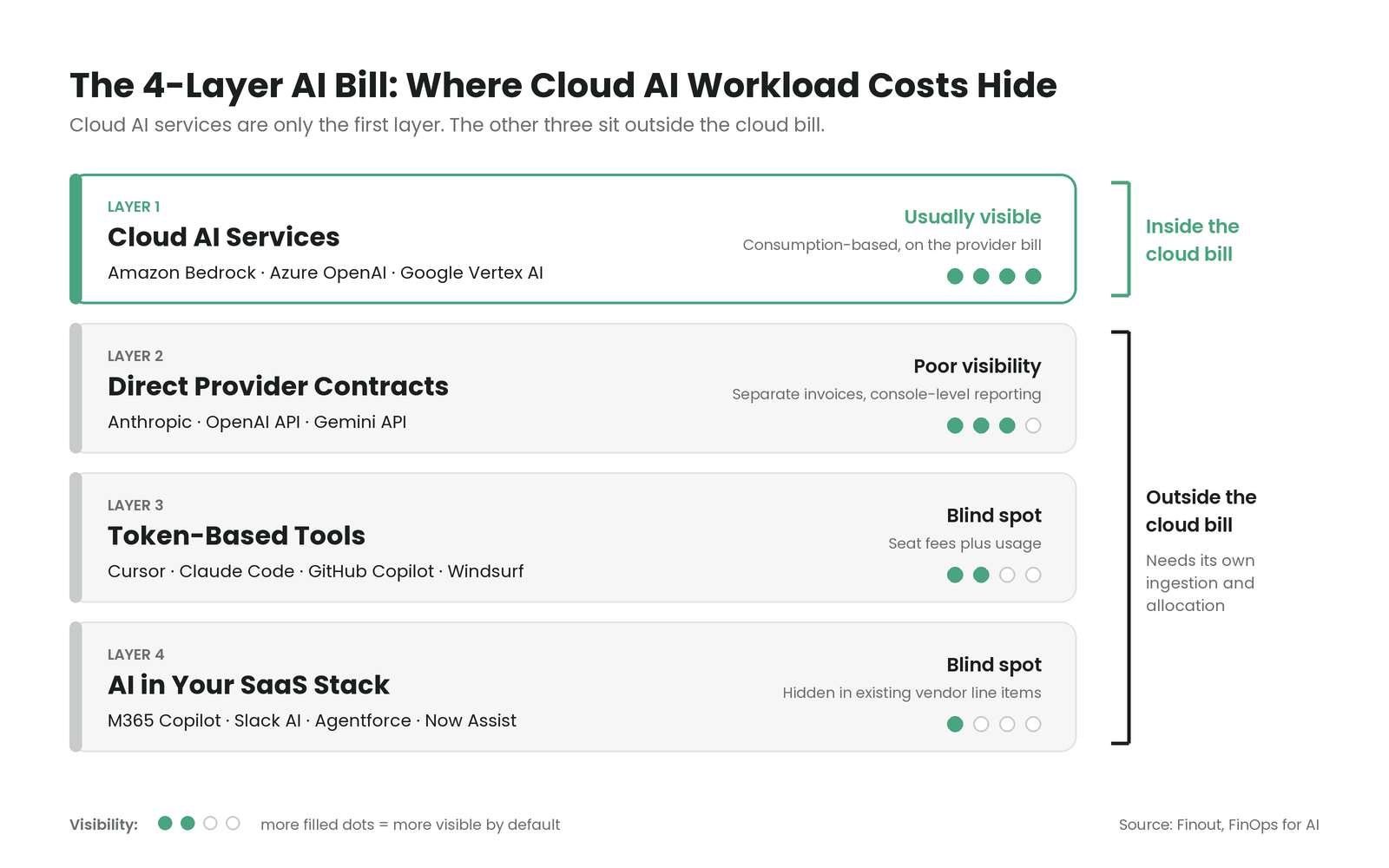
Count only Layer 1 and your "AI spend" number is wrong. The FinOps Foundation's FinOps Framework Scope definition describes "a defined segment of spending across technology categories, aligned to business constructs." Examples include products, cost centers, or environments.
AI Scopes should follow investments, such as a customer-facing assistant, rather than providers. When an AI Scope overlaps an existing cloud Scope, say it explicitly. The same GPU hours can sit in both, and double counting follows when nobody manages the overlap.
Unit Prices Fall While Bills Rise
Per the Epoch AI price decline report, "The cost of achieving a given level of AI performance has fallen about 47% per quarter since 2023, or 13× per year." Epoch measures the price of reaching a fixed benchmark level, and it says the figures "should not be read as exact."
That's a price trend, not a forecast of your bill. Cheaper intelligence tends to invite more use: bigger models, more calls per feature, and agents that loop. Forecasts and commitments built on today's unit prices go stale fast, and you should review them every quarter and whenever you change models.
How Do You Estimate Cloud AI Workload Costs Before You Deploy?
A practical first estimate is a range, which you then tighten with real data.
- List the cost drivers per component: Note what each part of the system consumes, including tokens, GPU hours, storage, and data transfer.
- Collect usage assumptions: Ask engineering and product for expected users, requests per user, tokens per request, and model choice.
- Build a formula: Multiply users by requests by tokens by price, then add compute, storage, and transfer.
- Set low, medium, and high ranges: Reasoning tokens, agent loops, and cache misses push real demand above the base case.
- Compare per-token and per-instance-hour options: Price a managed API against self-hosted GPUs at each traffic level to find where they cross.
- Check actuals and re-estimate: After launch, compare the estimate to the bill every month and update the ranges.
Proofs of concept mislead predictably, because a pilot rarely includes retraining, full-scale storage, monitoring, or production traffic. Add those drivers before the number goes to finance.
How Can You Reduce Cloud AI Workload Costs?
These five levers work best once you know who owns each cost. In the Qventus case study, the healthcare technology company with an AI-based SaaS solution reported "15% AWS cost savings in the first 6 months."
Senior DevOps Engineer Andy Wortman credited visibility. "The 15% cost savings can be partially, if not completely, attributable to the better visibility we are getting from Finout."
1. Share GPUs Instead of Dedicating Them
If small workloads each hold a full GPU, let them share. The same GKE documentation describes two ways to do it.
Multi-instance GPU splits one supported GPU into up to seven slices, each assigned to a different workload. Time-sharing lets several containers take turns on the same GPU.
Both come with limits. Time-sharing doesn't enforce memory limits and may add overhead, and GPU utilization metrics aren't available for multi-instance GPUs.
Downstream, allocation has to follow the slice. If three teams share one GPU, a wrong split of its hourly cost misprices every feature built on it.
2. Put Interruptible Training on Spot and Checkpoint Often
Training jobs can stop and restart, which makes them good candidates for spot capacity. Google's same Spot VM documentation recommends saving progress at regular intervals. That lets a job "pick up where it left off, rather than start over from scratch."
Keep production inference off spot, because a reclaimed instance mid-request means failed responses for your users.
Checkpoints add storage cost, and old ones should expire on a schedule. The spot discount only lowers your cost per training run when checkpoint storage and restarts don't eat it.
3. Scale Idle Inference to Zero
To scale to zero means a service shuts down every running instance when no requests arrive, then starts again when traffic returns. Per Cloud Run GPU scale-to-zero docs, "Instances of a Cloud Run service that has been configured to use GPU can scale down to zero for cost savings when not in use."
The first request after an idle period waits for a cold start, the time it takes to boot an instance and load the model. Setting minimum instances avoids the delay. But the same page notes that minimum instances are charged at the full rate even when idle.
This fits spiky or low-traffic endpoints, such as internal tools, where a slow first response costs users little.
4. Commit Only to the Steady Baseline
Find the lowest level of inference usage you've sustained over recent months. Commit to that floor, and leave peaks on on-demand or serverless capacity.
Review commitment terms as prices fall, because a three-year commitment sized to today's model can outlast it. An oversized commitment raises your cost per token, and that flows straight into the margin on every AI feature it supports.
5. Match the Model to the Task
Routine tasks such as classification, extraction, or short summaries often run well on smaller, cheaper models. Save larger reasoning models for work that needs them.
Three signals show whether the match works:
- Input/output token ratio: A rising share of output tokens can signal verbose answers or runaway reasoning.
- Cache hit rate: Routing work to a different model can break prompt caching and erase the savings you expected.
- Cost per outcome: Measure cost per resolved ticket or completed task, because a cheap model that fails costs more after retries.
The goal is the most useful output per dollar, and the cheapest model on paper can cost the most per outcome.
What Does This Mean in Practice?
The right first move depends on where your spend sits and who's asking. Behind "What is AI costing us?" there's usually a decision, such as which product to fund or how to price a feature.
- If spend spans several clouds and API providers: Allocate first, because you can't compare or cut costs that no one owns.
- If most spend is training: Prioritize spot capacity, checkpoints, and job scheduling, because training is the spend you can move and pause.
- If inference traffic is steady: Commit to the floor, because that baseline is the only usage predictable enough to commit to.
- If finance asks what AI is costing: Answer at the feature or customer level, because that's where pricing and investment decisions get made.
Each stakeholder needs something different from the same data:
- FinOps teams: Create a new AI Scope only when a distinct business outcome requires it, because every Scope adds upkeep.
- Engineering leaders: Judge hardware and serving choices by delivered cost per token or request rather than price per GPU-hour.
- Finance leaders: Treat AI cost as a business model question, because consumption-based pricing changes how predictable both cost and revenue are.
How Finout Helps You Own Cloud AI Workload Costs
Finout is an enterprise-grade FinOps platform for cloud and AI spend, built for the agentic era.
FinOps for AI natively ingests Amazon Bedrock, Google Vertex AI, Azure OpenAI, OpenAI, and Anthropic costs, with allocation per token, model, team, and agent. Unit-economics anomalies in FinOps for AI alert on cost per million tokens, catching a pricier model mix even when volume looks flat.
- Billy: Answers plain-English questions about your cloud and AI spend with chart-backed answers.
- FinOps Agents: Helps teams detect cost anomalies and waste, investigate likely causes, and route approved follow-up to owners through Jira, Slack, or ServiceNow.
- FinOps for Agents: Offers an MCP server for querying Finout cost data from clients like Claude and Cursor. Adds a Data Exporter and Cost & Usage API.
- MegaBill: Brings cloud and AI costs together in a single, unified view.
- AI-Powered Virtual Tags: Scans names, labels, namespaces, accounts, projects, and metadata to propose allocation rules by team, service, environment, or business unit.
- Shared Cost: Reallocates shared expenses, such as data transfer and Kubernetes idle, with telemetric-based or custom rules for 100% cost allocation.
- Anomaly Detection: Uses machine learning to flag unusual spend, with real-time alerts by Slack or email.
- Financial Plans: Sets budgets by feature, team, or segment, forecasts from history and seasonality, and tracks actuals against plan in real time.
- CostGuard: Unifies cloud recommendations in one action hub, prioritizes them, and assigns owners.
- Unit economics widget: Breaks down cloud costs to show how much it takes to support each customer, transaction, or service.
Want to see your cloud AI workload costs mapped to the teams and features behind them? Book a demo.

.svg)




